

A High-Throughput Checkout System
for Convenience Store
A High-Throughput Checkout System
for Convenience Store
A High-Throughput Checkout System for Peak Crowds
A High-Throughput Checkout System for Peak Crowds
MY ROLE
MY ROLE
Lead Designer
Feature Scoping, Research, Interaction Design, Prototyping, UI Design, Lottie Design, Dev Handoff
Lead Designer
Feature Scoping, Research, Interaction Design, Prototyping, UI Design, Lottie Design, Dev Handoff
team
team
Lead Designer
3 Backend Engineers
2 Frontend Engineers
3 Product Managers
2 Devops
3 Data Engineers
Lead Designer
3 Backend Engineers
2 Frontend Engineers
3 Product Managers
2 Devops
3 Data Engineers
Duration
Duration
2 Months
2 Months
2 Months
OVERVIEW
OVERVIEW
Checkout often fails in high-traffic retail—long queues, slow scans, and fragile self-checkout create loss and frustration, especially across large store networks. RadiusAI’s ShopAssist tackles this with real-time computer vision, recognizing items instantly to keep checkout fast, reliable, and effortless. This case study shows how a high-throughput computer vision system reduces checkout time and lowers the effort required from store staff and customers.
Checkout often fails in high-traffic retail—long queues, slow scans, and fragile self-checkout create loss and frustration, especially across large store networks. RadiusAI’s ShopAssist tackles this with real-time computer vision, recognizing items instantly to keep checkout fast, reliable, and effortless. This case study shows how a high-throughput computer vision system reduces checkout time and lowers the effort required from store staff and customers.
Checkout often fails in high-traffic retail—long queues, slow scans, and fragile self-checkout create loss and frustration, especially across large store networks. RadiusAI’s ShopAssist tackles this with real-time computer vision, recognizing items instantly to keep checkout fast, reliable, and effortless. This case study shows how a high-throughput computer vision system reduces checkout time and lowers the effort required from store staff and customers.
Problem Statement
Problem Statement
Problem Statement
High-traffic retail environments — stadiums, airports, convenience stores — face recurring operational strain during peak hours.
During these peak moments, the problem becomes visible through checkout-level failures:
High-traffic retail environments — stadiums, airports, convenience stores — face recurring operational strain during peak hours.
During these peak moments, the problem becomes visible through checkout-level failures:
Queue buildup due to unresolved scans
Long checkout queues
leading to lost sales
Inconsistent item recognition across locations
Inconsistent checkout experiences
across locations
Manual barcode scanning slowing down transaction speed
Frequent switching between billing devices disrupting checkout flow
Manual barcode scanning slowing down transaction speed
High dependency on cashier efficiency impacting checkout performance
High dependency on
cashier efficiency
For enterprise clients operating hundreds of locations, even small delays at checkout compound into significant revenue loss and poor customer experience.
For enterprise clients operating hundreds of locations, even small delays at checkout compound into significant revenue loss and poor customer experience.
For enterprise clients operating hundreds of locations, even small delays at checkout compound into significant revenue loss and poor customer experience.
Existing Solution
Existing Solution
1
1
Traditional POS (Barcode Scanning)
Traditional POS (Barcode Scanning)
Manual barcode scanning is slow, labor-heavy, and fragile under pressure.
Every item requires alignment, focus, and time — turning peak hours into bottlenecks.
Manual barcode scanning is slow, labor-heavy, and fragile under pressure.
Every item requires alignment, focus, and time — turning peak hours into bottlenecks.
Manual barcode scanning is slow, labor-heavy, and fragile under pressure.
Every item requires alignment, focus, and time — turning peak hours into bottlenecks.
2
2
Self-Checkout Kiosks
Self-Checkout Kiosks
Self-checkout shifts effort to customers. In high-traffic spaces it increases friction, abandonment, and shrinkage, especially when mistakes interrupt the flow.
Self-checkout shifts effort to customers. In high-traffic spaces it increases friction, abandonment, and shrinkage, especially when mistakes interrupt the flow.
Self-checkout shifts effort to customers. In high-traffic spaces it increases friction, abandonment, and shrinkage, especially when mistakes interrupt the flow.
3
3
RFID / Smart Scales
RFID / Smart Scales
RFID and smart-scale systems demand costly infrastructure and special packaging. They struggle with mixed baskets and real-world clutter.
RFID and smart-scale systems demand costly infrastructure and special packaging. They struggle with mixed baskets and real-world clutter.
RFID and smart-scale systems demand costly infrastructure and special packaging. They struggle with mixed baskets and real-world clutter.
4
4
Mobile App Checkout
Mobile App Checkout
App-based checkout adds onboarding friction. It fails where speed and spontaneity matter stadiums, airports, and convenience retail.
App-based checkout adds onboarding friction. It fails where speed and spontaneity matter stadiums, airports, and convenience retail.
App-based checkout adds onboarding friction. It fails where speed and spontaneity matter stadiums, airports, and convenience retail.
Proposed Solution
Proposed Solution
RadiusAI replaces barcode scanning with automatic item recognition using overhead cameras.
The challenge was to turn complex computer vision into a simple, fast, and trustworthy checkout experience, while still handling enterprise-level complexity behind the scenes.
RadiusAI replaces barcode scanning with automatic item recognition using overhead cameras.
The challenge was to turn complex computer vision into a simple, fast, and trustworthy checkout experience, while still handling enterprise-level complexity behind the scenes.
RadiusAI’s computer-vision platform enables automatic item recognition using overhead cameras removing the need for barcode scanning.
The design challenge was to translate this advanced technology into a simple, trustworthy, and fast customer experience, while supporting complex enterprise needs behind the scenes.
Camera Layer
This layer continuously captures and interprets items placed in the checkout zone,
enabling real-time detection and pricing.
Pilot Setup
Pilot Setup
The pilot setup included an overhead camera system, edge computer, and POS integration working together as a single unit.
Items placed under the camera were processed on the edge computer in real time, with outputs instantly sent to the POS system.
This ensured that recognized items automatically appeared on the cashier screen, enabling a fast and seamless checkout flow.
The pilot setup included an overhead camera system, edge computer, and POS integration working together as a single unit.
Items placed under the camera were processed on the edge computer in real time, with outputs instantly sent to the POS system.
This ensured that recognized items automatically appeared on the cashier screen, enabling a fast and seamless checkout flow.
The pilot setup included an overhead camera system, edge computer, and POS integration working together as a single unit.
Items placed under the camera were processed on the edge computer in real time, with outputs instantly sent to the POS system.
This ensured that recognized items automatically appeared on the cashier screen, enabling a fast and seamless checkout flow.
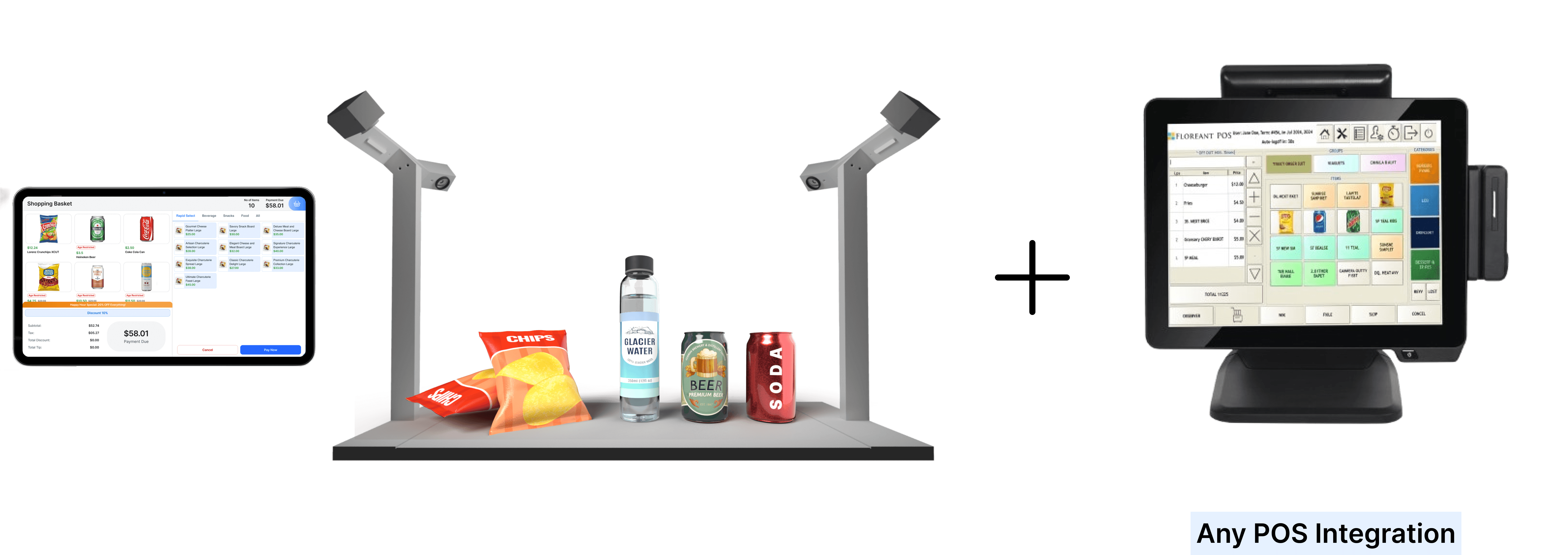
Figure: A representation of a typical POS with any POS Integration along with a Customer Screen
Fig: Customers place items within the scanning zone, where
overhead cameras automatically
Fig: Customers place items within the scanning zone, where overhead cameras automatically
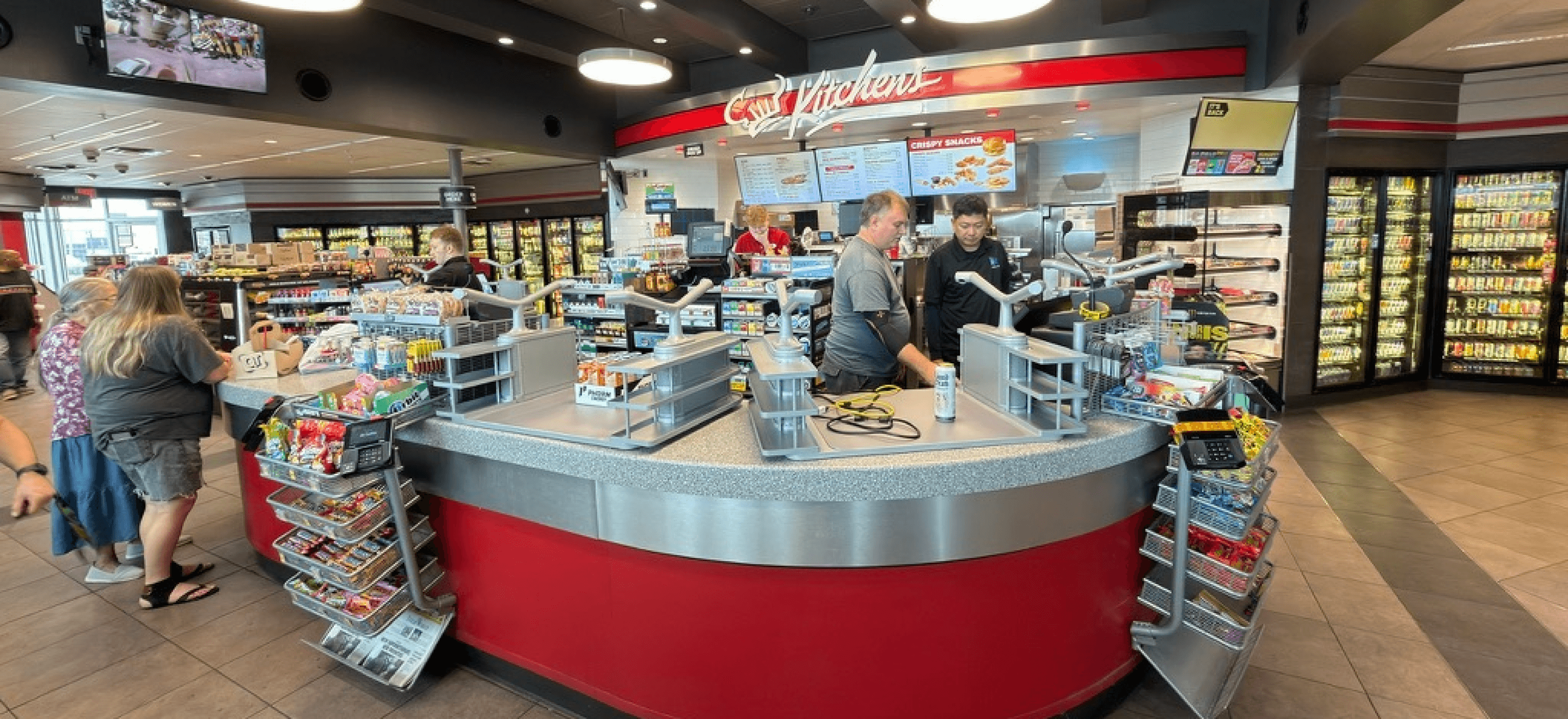
Figure: Customers place items within the scanning zone, where
overhead cameras automatically
Fig: Customers place items within the scanning zone, where
overhead cameras automatically
Fig: Customers place items within the scanning zone, where overhead cameras automatically
View the demo
with NVIDIA
View the demo
with NVIDIA
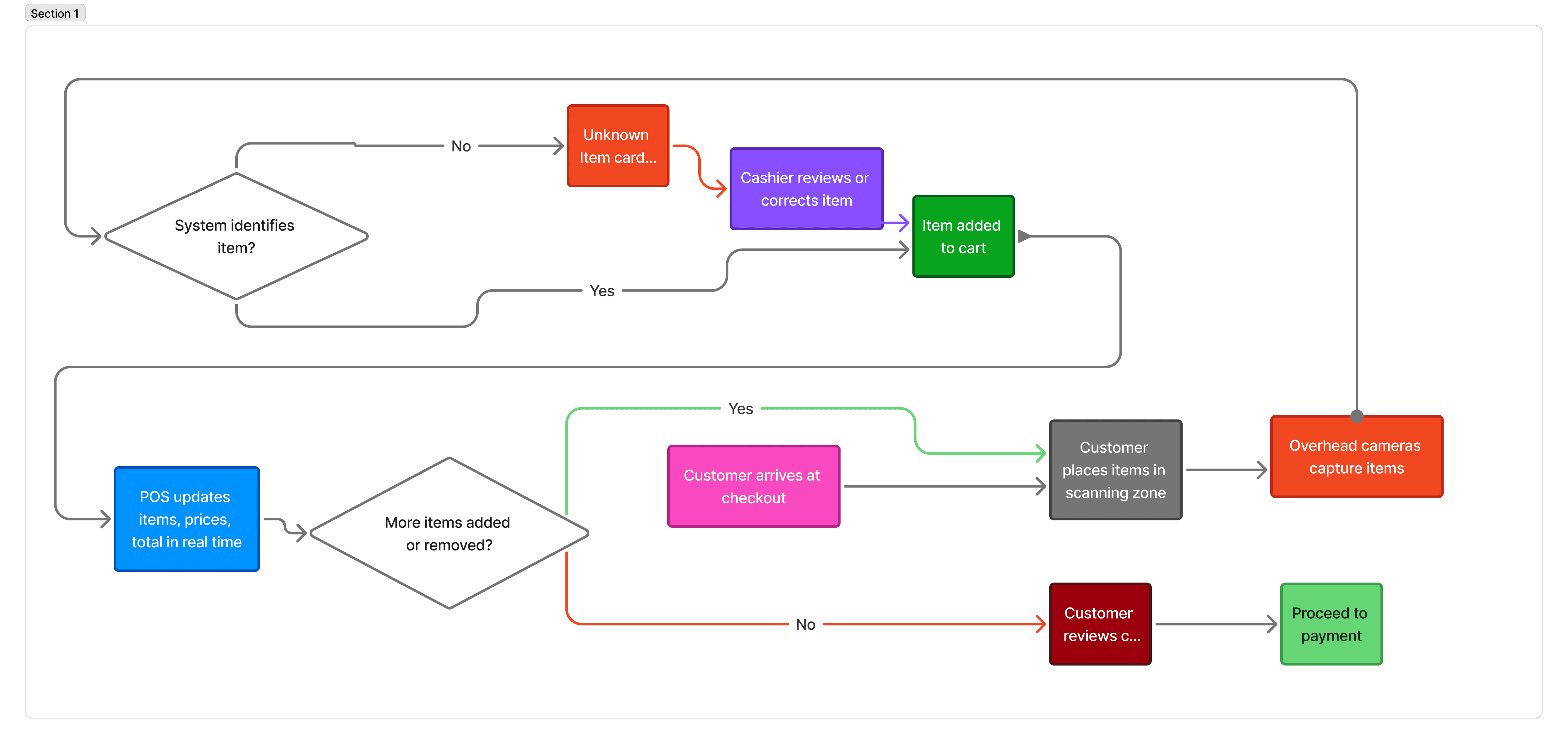
This flow maps the happy path of AI-assisted checkout, where overhead cameras identify items in real time and instantly sync them with the POS.
It also shows how unknown items are gracefully intercepted, enabling quick cashier intervention while keeping the customer journey uninterrupted.
This flow maps the happy path of AI-assisted checkout, where overhead cameras identify items in real time and instantly sync them with the POS.
It also shows how unknown items are gracefully intercepted, enabling quick cashier intervention while keeping the customer journey uninterrupted.
This flow maps the happy path of AI-assisted checkout, where overhead cameras identify items in real time and instantly sync them with the POS.
It also shows how unknown items are gracefully intercepted, enabling quick cashier intervention while keeping the customer journey uninterrupted.
try the prototype
try the prototype
This flow maps the happy path of AI-assisted checkout, where overhead cameras identify items in real time and instantly sync them with the POS.
It also shows how unknown items are gracefully intercepted, enabling quick cashier intervention while keeping the customer journey uninterrupted.
This flow maps the happy path of AI-assisted checkout, where overhead cameras identify items in real time and instantly sync them with the POS.
It also shows how unknown items are gracefully intercepted, enabling quick cashier intervention while keeping the customer journey uninterrupted.
This flow maps the happy path of AI-assisted checkout, where overhead cameras identify items in real time and instantly sync them with the POS.
It also shows how unknown items are gracefully intercepted, enabling quick cashier intervention while keeping the customer journey uninterrupted.
try the prototype
This flow maps the happy path of AI-assisted checkout, where overhead cameras identify items in real time and instantly sync them with the POS.
It also shows how unknown items are gracefully intercepted, enabling quick cashier intervention while keeping the customer journey uninterrupted.
Pilot Clients
Pilot Clients
In addition, targeted pilots were run in large sports and entertainment venues—testing the system under extreme peak loads and high-pressure, time-sensitive environments.
In addition, targeted pilots were run in large sports and entertainment venues—testing the system under extreme peak loads and high-pressure, time-sensitive environments.
In addition, targeted pilots were run in large sports and entertainment venues—testing the system under extreme peak loads and high-pressure, time-sensitive environments.

Fig : Logo of venues which were locked for Pilot Setup
Fig : Logo of venues which were locked for Pilot Setup
Fig : Logo of venues which were locked for Pilot Setup
Happy Path Flow
Happy Path Flow
This flow maps the happy path of AI-assisted checkout, where overhead cameras identify items in real time and instantly sync them with the POS.
It also shows how unknown items are gracefully intercepted, enabling quick cashier intervention while keeping the customer journey uninterrupted.
This flow maps the happy path of AI-assisted checkout, where overhead cameras identify items in real time and instantly sync them with the POS.
It also shows how unknown items are gracefully intercepted, enabling quick cashier intervention while keeping the customer journey uninterrupted.
This flow maps the happy path of AI-assisted checkout, where overhead cameras identify items in real time and instantly sync them with the POS.
It also shows how unknown items are gracefully intercepted, enabling quick cashier intervention while keeping the customer journey uninterrupted.
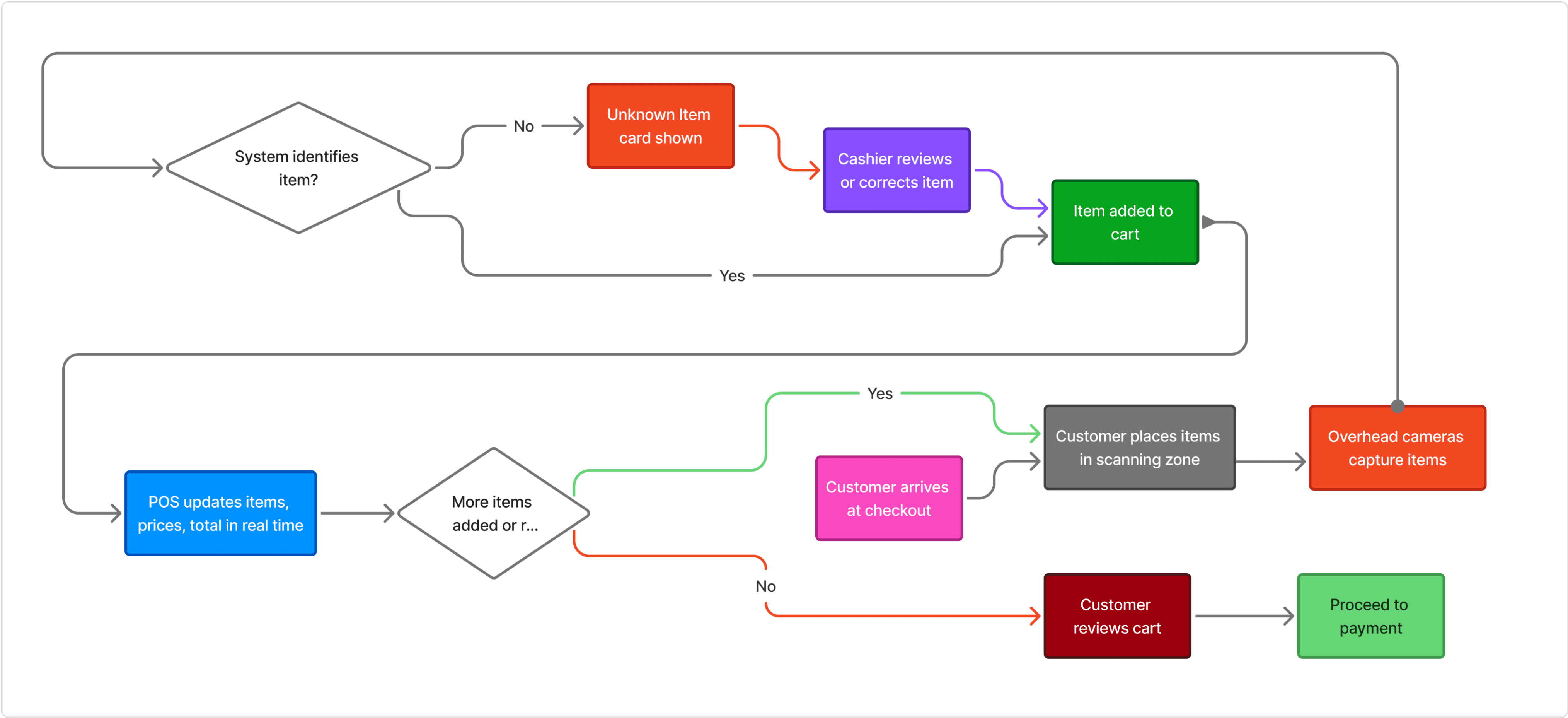
Figure: End-to-end happy path of the vision-powered checkout flow
Fig: End-to-end happy path of the vision-powered checkout flow
Fig: End-to-end happy path of the vision-powered checkout flow
Design implementation
Happy Path Flow
Happy Path Flow
This flow explores the ideal customer journey—from placing items to completing payment showcasing how checkout unfolds seamlessly in the best-case scenario.
Unknown items Flow
This flow explores the ideal customer journey—from placing items to completing payment showcasing how checkout unfolds seamlessly in the best-case scenario.
01
01
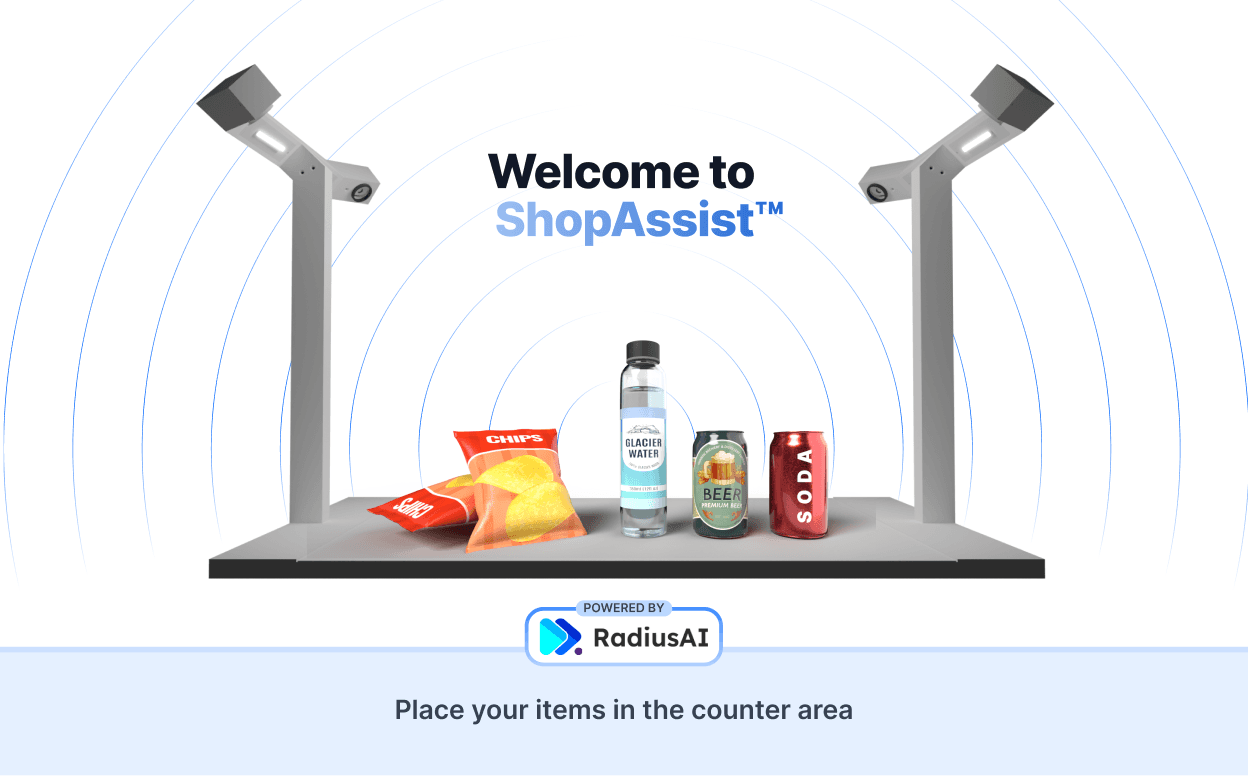
LANDING PAGE
LANDING PAGE
The landing page of setup is suppose to give you a direct instruction of what are the next steps
The landing page of setup is suppose to give you a direct instruction of what are the next steps
02
02
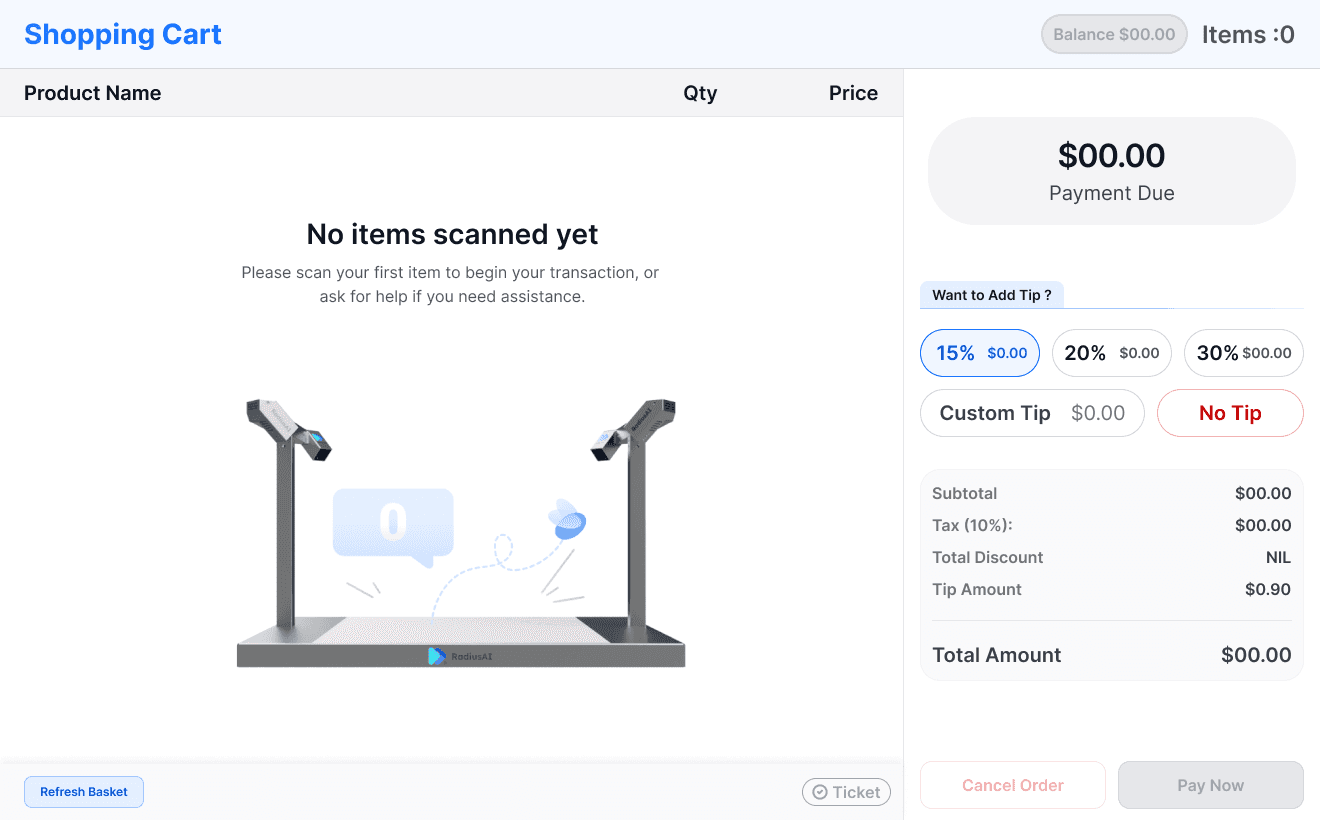
CART PAGE - EMPTY
CART PAGE - EMPTY
The state of the device when the cart is empty. It occurs after the cart has been filled and then cleared again before payment.
The state of the device when the cart is empty. It occurs after the cart has been filled and then cleared again before payment.
03
03
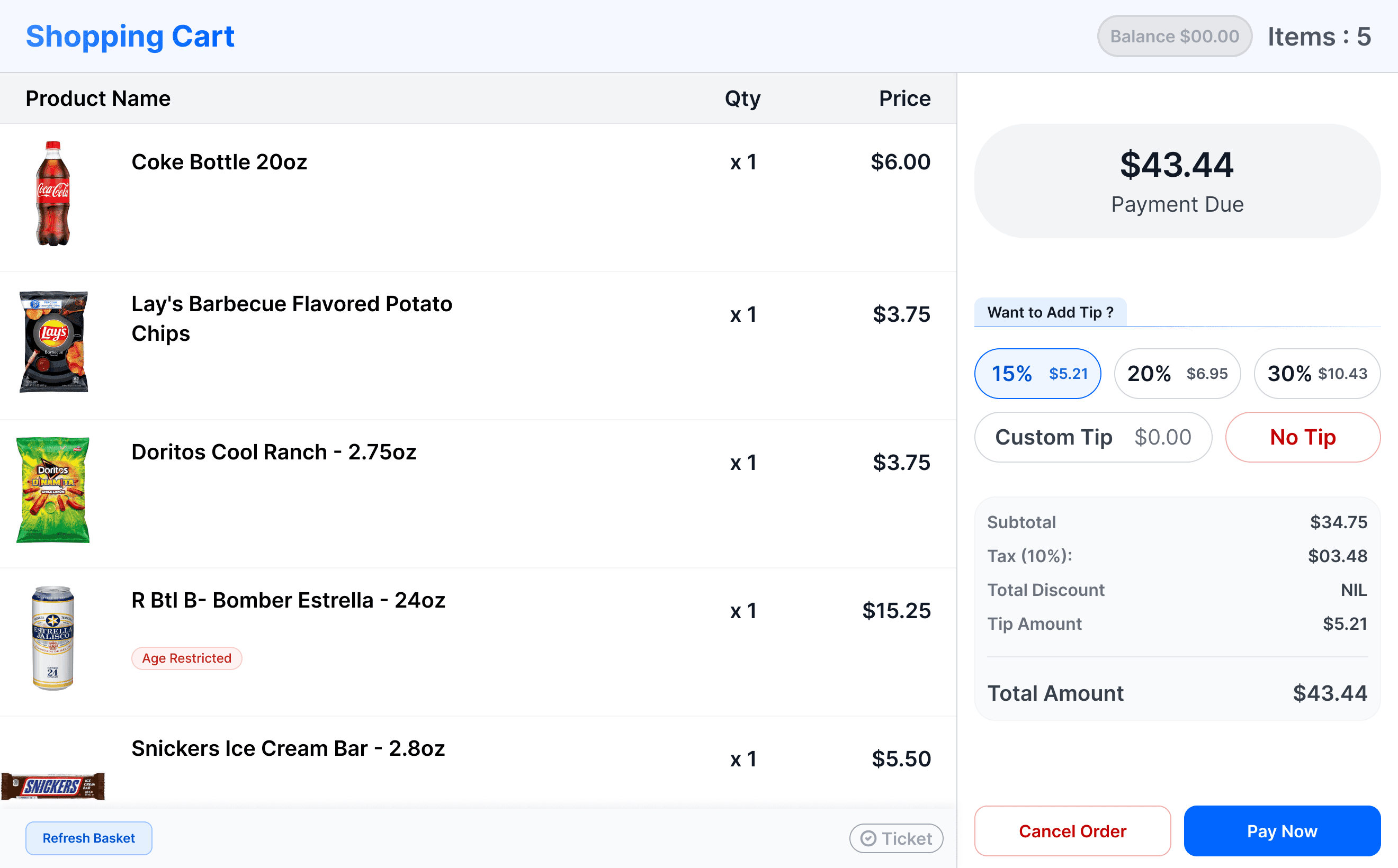
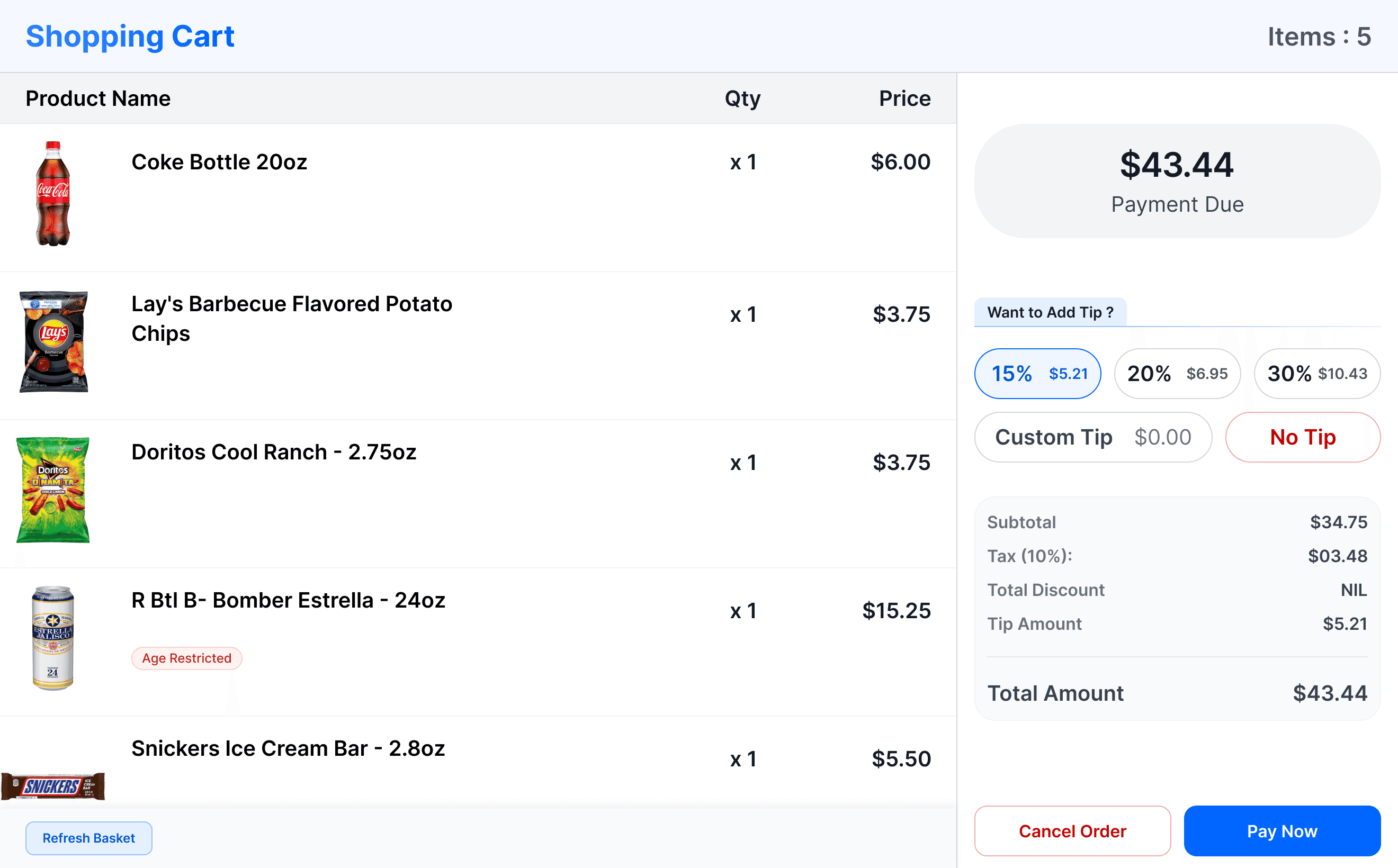
CART PAGE - FILLED
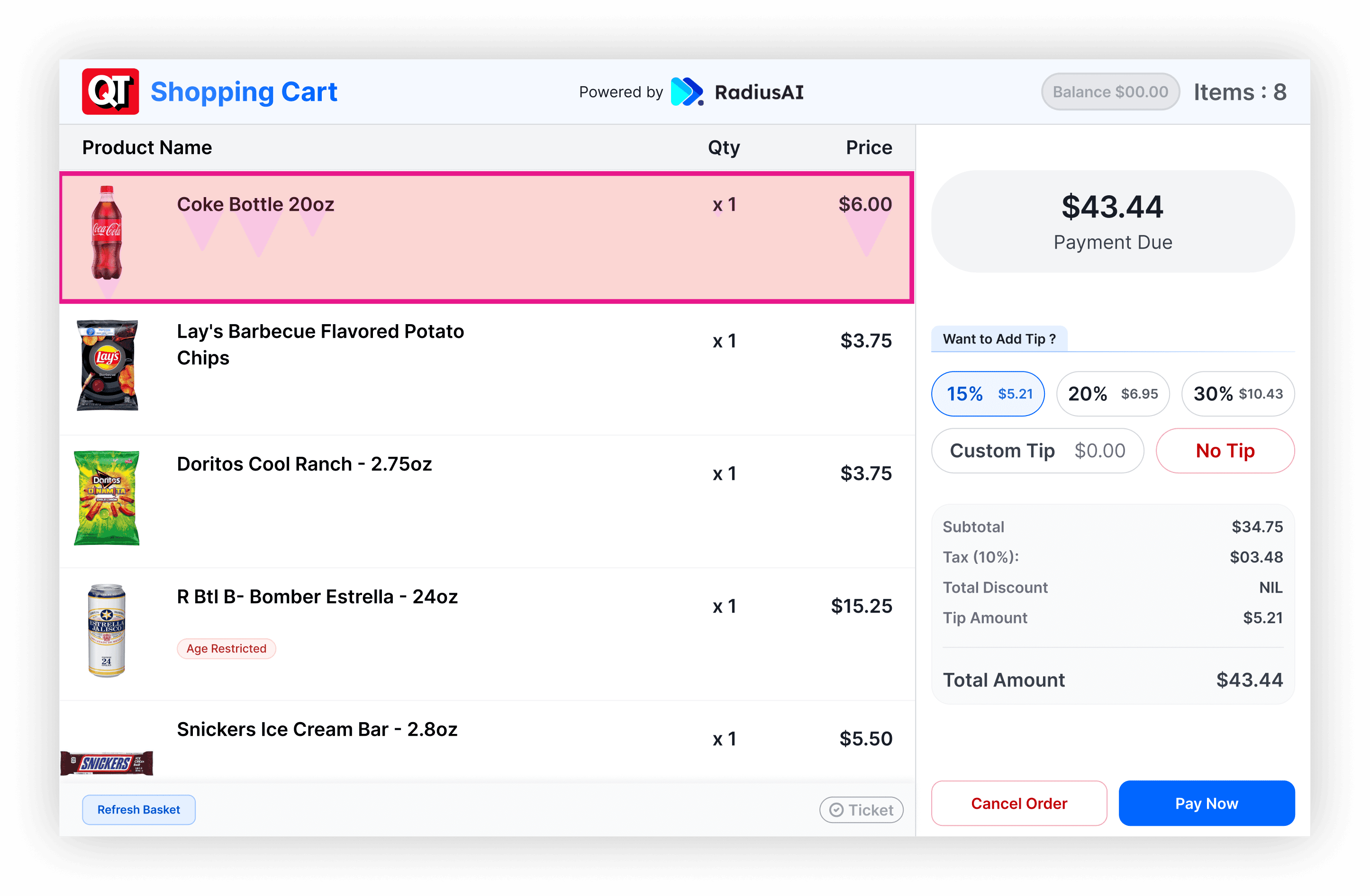
CART PAGE FILLED
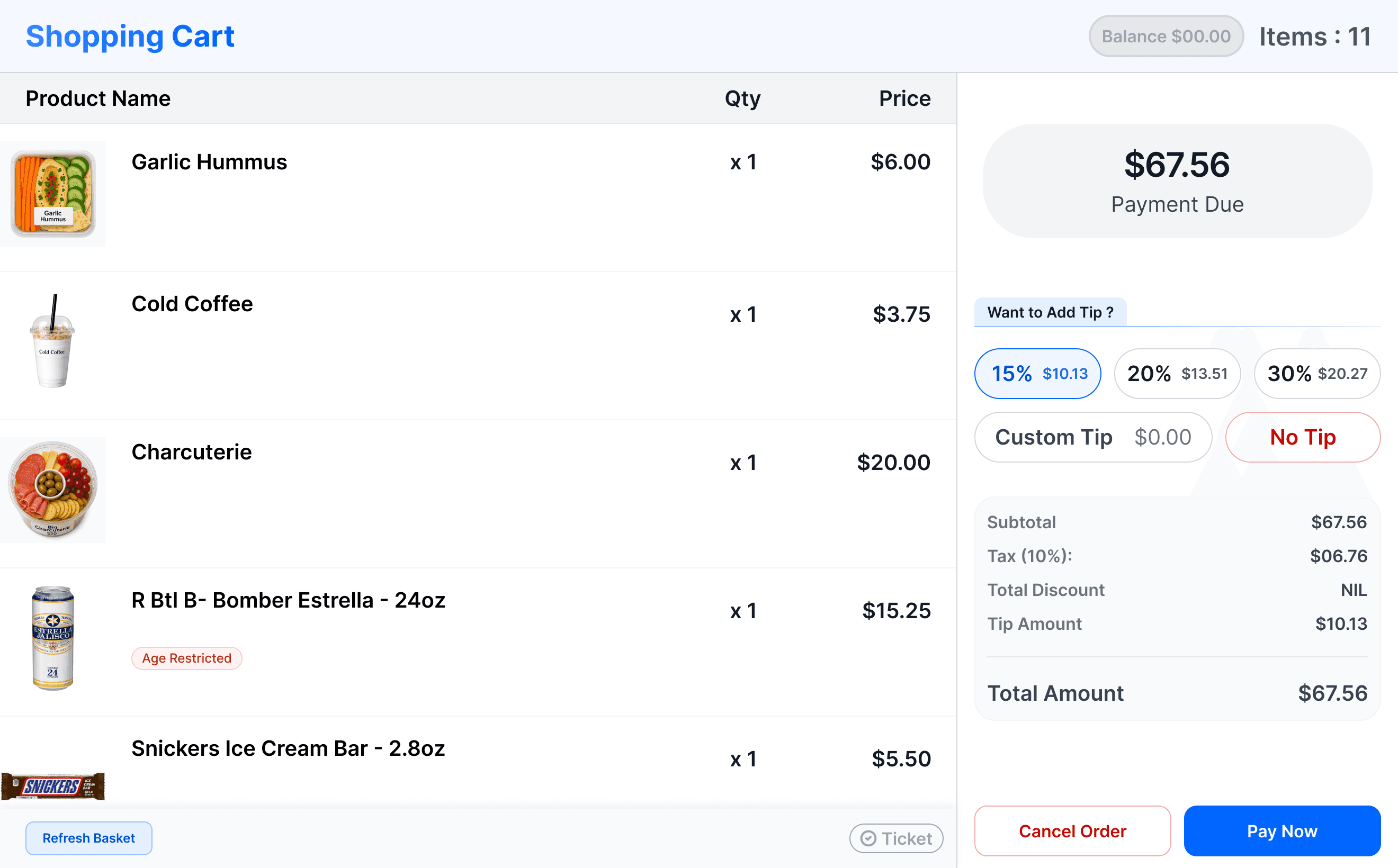
Each scanned item appears in the cart with its quantity, price, and a corresponding thumbnail for quick visual confirmation.
Each scanned item appears in the cart with its quantity, price, and a corresponding thumbnail for quick visual confirmation.
CORE INTERACTIONS:
CORE INTERACTIONS
1. Refresh
Restarts scanning if items stop appearing.
Restarts scanning if items stop appearing.
2. Tip
2. Tip
Defaults to 15% to encourage appreciation.
Defaults to 15% to encourage appreciation.
04
04
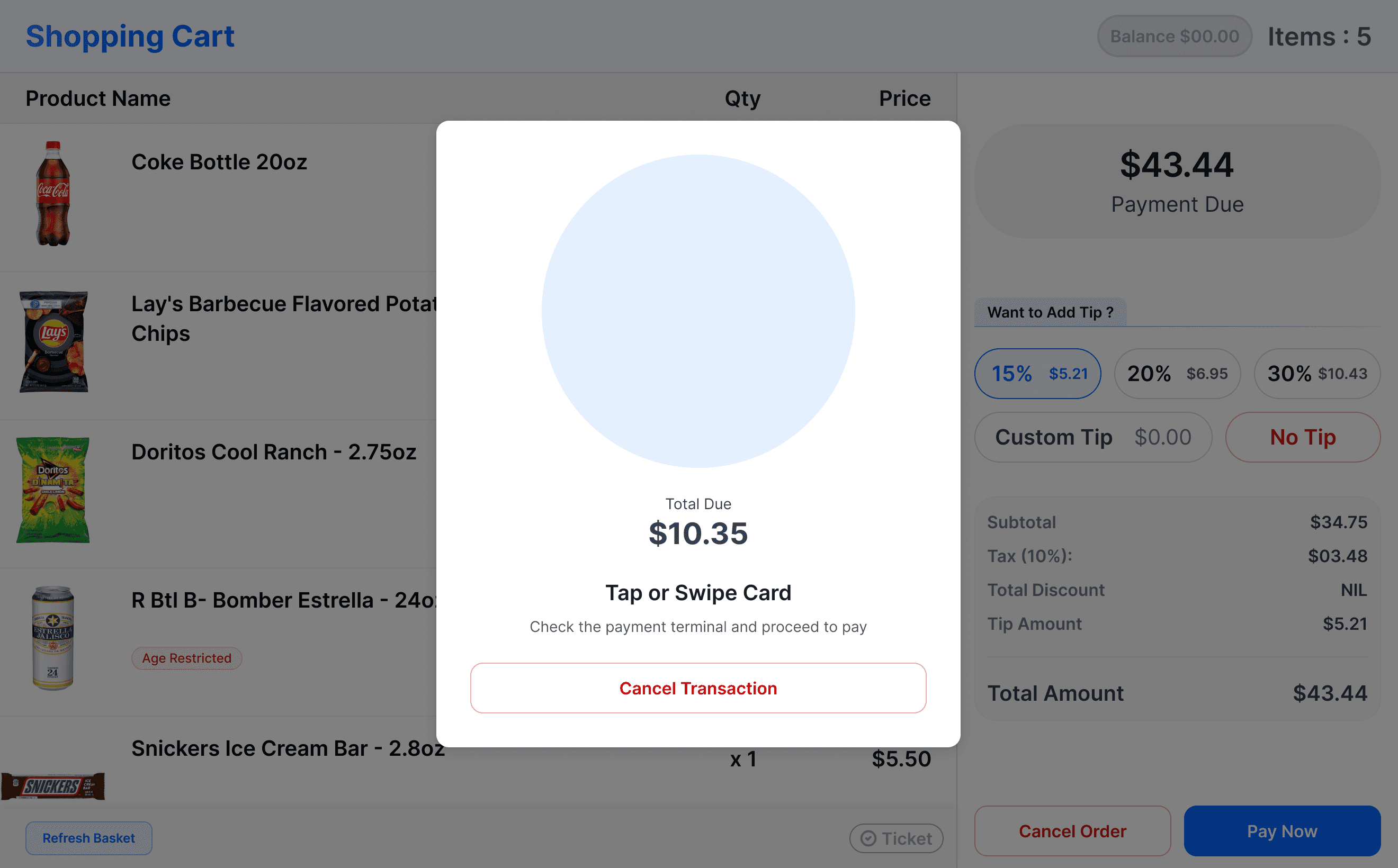
PAYMENT MODAL
PAYMENT MODAL
The modal guides the user to interact with the payment terminal. Once the user taps on the POI, the payment is processed instantly, and the following screen confirms a successful transaction.
The modal guides the user to interact with the payment terminal. Once the user taps on the POI, the payment is processed instantly, and the following screen confirms a successful transaction.
05
05
SUCCESS PAGE
SUCCESS PAGE
The modal guides the user to interact with the payment terminal. Once the user taps on the POI, the payment is processed instantly, and the following screen confirms a successful transaction.
The modal guides the user to interact with the payment terminal. Once the user taps on the POI, the payment is processed instantly, and the following screen confirms a successful transaction.

Design implementation
Happy Path Flow
This flow explores the ideal customer journey—from placing items to completing payment showcasing how checkout unfolds seamlessly in the best-case scenario.
Design implementation
Happy Path Flow
This flow explores the ideal customer journey—from placing items to completing payment showcasing how checkout unfolds seamlessly in the best-case scenario.
Unknown Items Flow
This flow explores the ideal customer journey—from placing items to completing payment showcasing how checkout unfolds seamlessly in the best-case scenario.
01
01
LANDING PAGE
LANDING PAGE
The landing page of setup is suppose to give you a direct instruction of what are the next steps
The landing page of setup is suppose to give you a direct instruction of what are the next steps
02
02
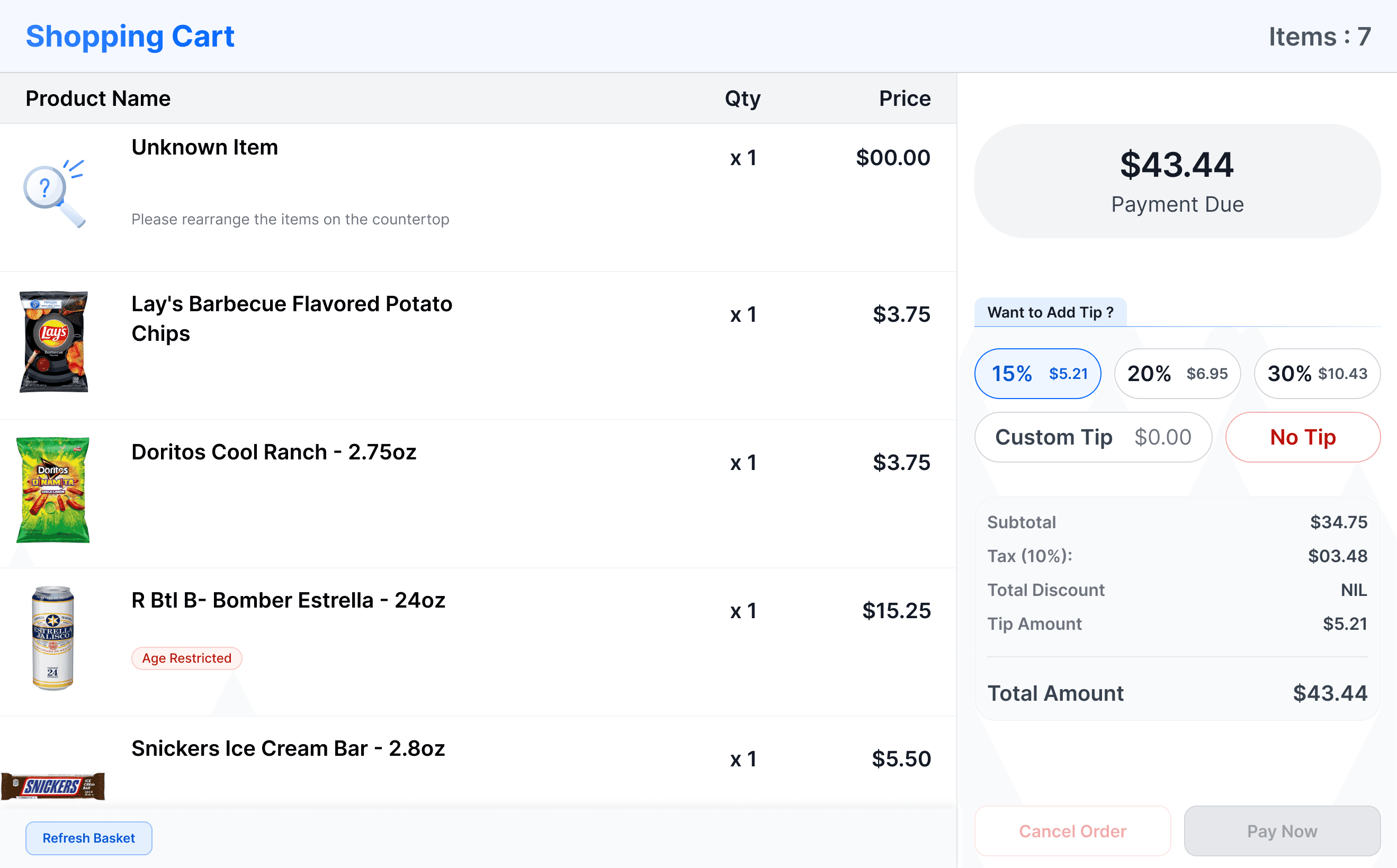
CART PAGE - Unknown items
CART PAGE - Unknown items
Any item that isn’t mapped to the inventory appears as an Unknown Item when placed on the ShopAssist base and is reflected the same way in the Shopping Cart.
Any item that isn’t mapped to the inventory appears as an Unknown Item when placed on the ShopAssist base and is reflected the same way in the Shopping Cart.
03
03
rearrange items
rearrange items
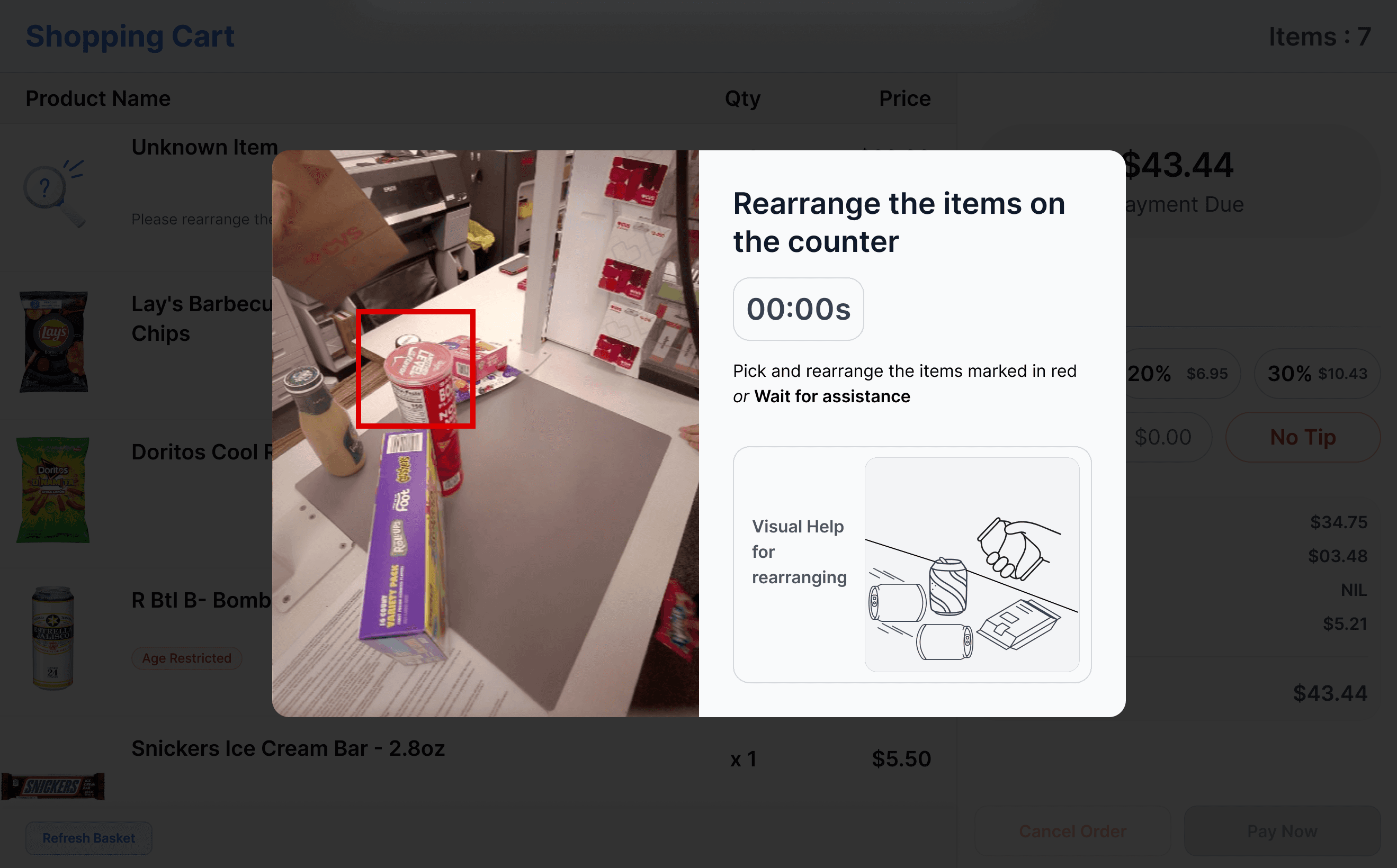
The quickest way to resolve an Unknown Item is to rearrange the annotated product on the base.
If the system recognizes the item within a 5-second window, it is automatically mapped to a line item in the cart. If not, the system flags it as Not Identified.
The quickest way to resolve an Unknown Item is to rearrange the annotated product on the base.
If the system recognizes the item within a 5-second window, it is automatically mapped to a line item in the cart. If not, the system flags it as Not Identified.
04
04
rearrange items
Not Identified
rearrange items
Not Identified
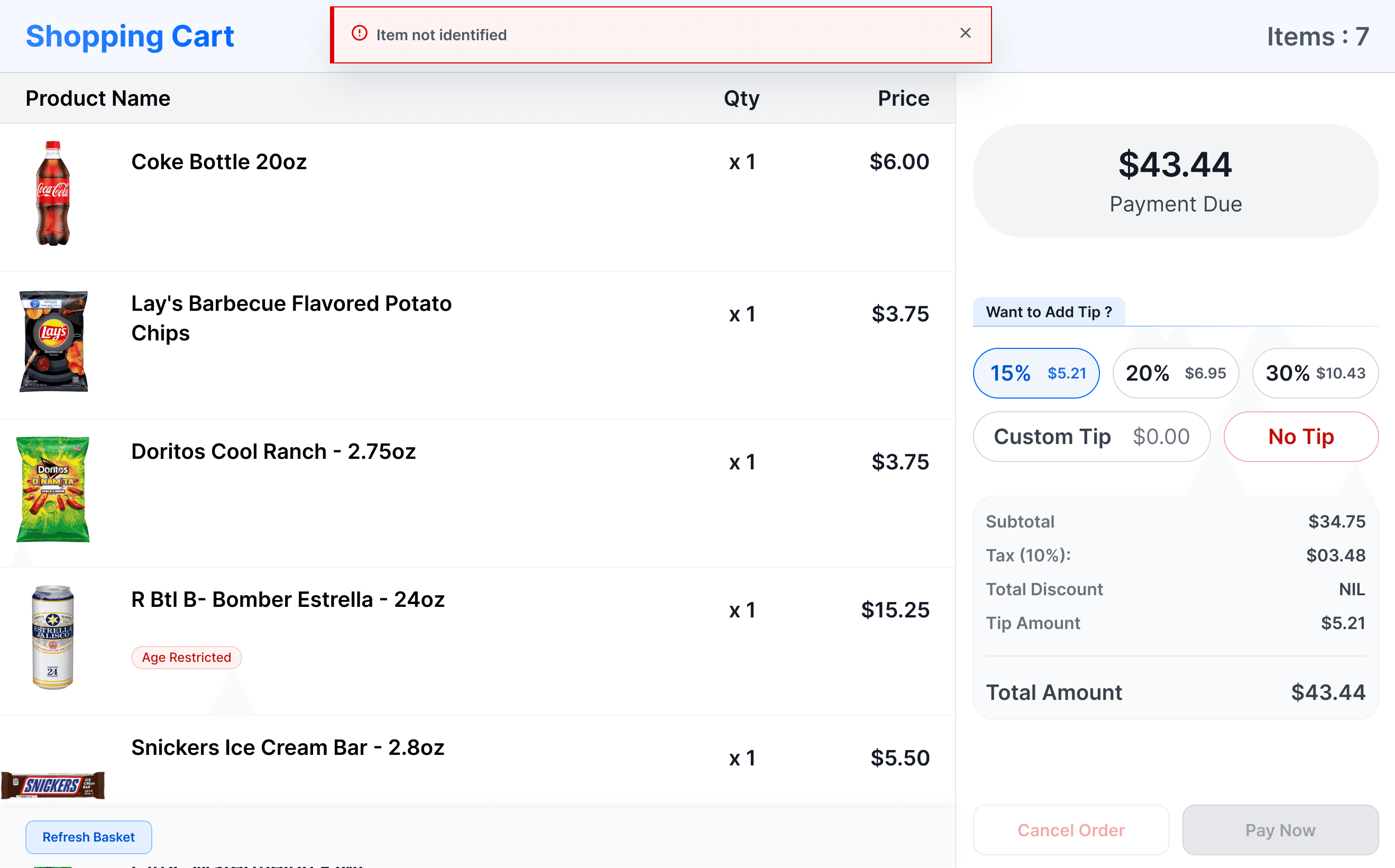
Here is how the screen renders the error if the item isn’t identified within given time.
Here is how the screen renders the error if the item isn’t identified within given time.
05
05
Scan the barcode of item
Scan the barcode of item
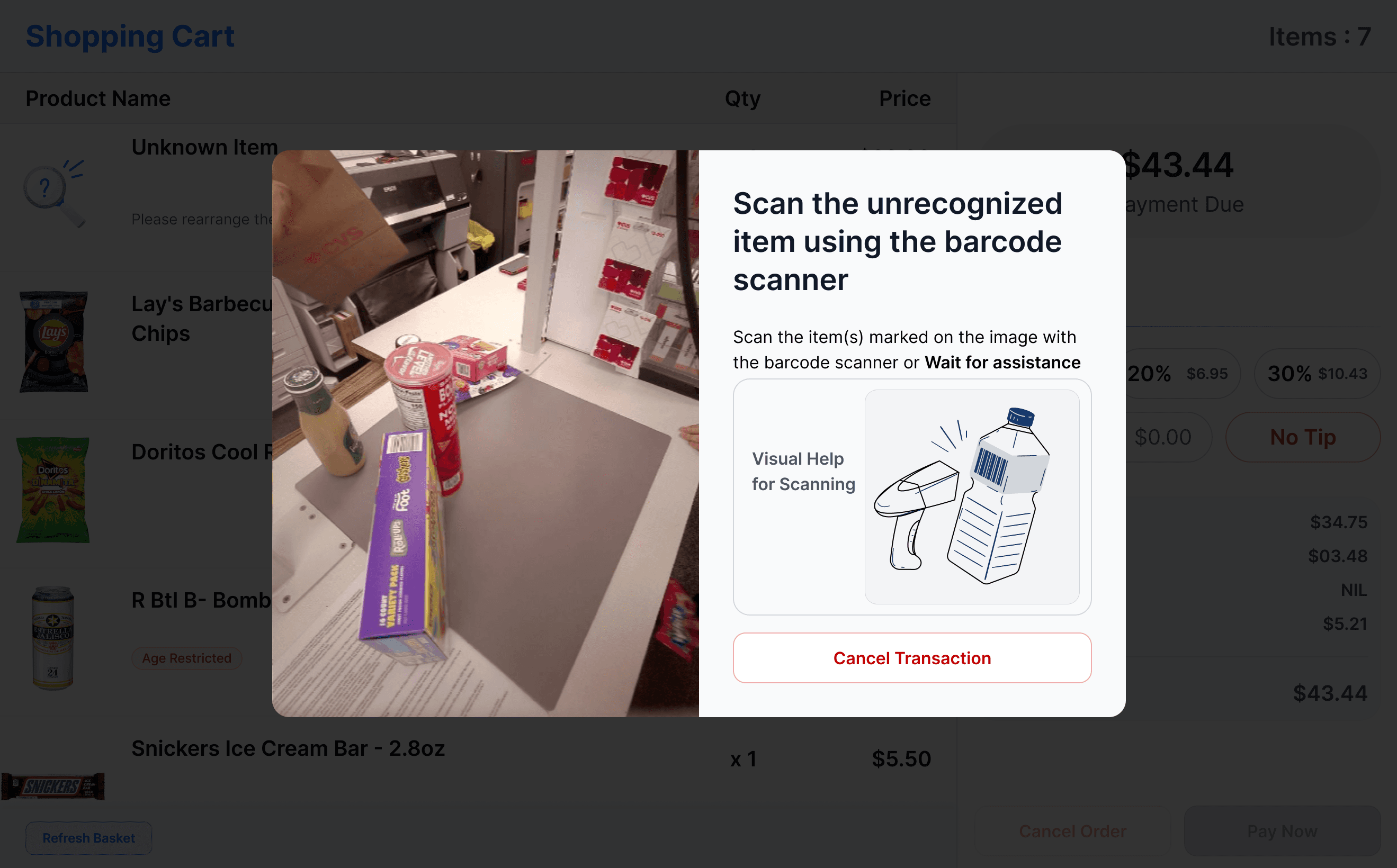
Once an item is marked as Unidentified, a modal prompts the user to pick up the barcode scanner and scan the product.
If the scan succeeds, the item is instantly recognized and appears correctly in the cart.
Once an item is marked as Unidentified, a modal prompts the user to pick up the barcode scanner and scan the product.
If the scan succeeds, the item is instantly recognized and appears correctly in the cart.
06
06
Updated item in the cart
Updated item in the cart
The cart updates instantly with the resolved item, and the Pay
Now button becomes active, allowing the user to proceed with payment for all scanned items.
The cart updates instantly with the resolved item, and the Pay
Now button becomes active, allowing the user to proceed with payment for all scanned items.
Trade Offs
Trade Offs
INVENTORY MANAGEMENT
INVENTORY MANAGEMENT
Each new SKU requires a dedicated data-science model to ensure reliable recognition. This limited rapid catalog expansion in phase one in favor of accuracy and system trust.
Each new SKU requires a dedicated data-science model to ensure reliable recognition. This limited rapid catalog expansion in phase one in favor of accuracy and system trust.
rECTIFICATION PATHWAY FOR unknown items
rECTIFICATION PATHWAY FOR unknown items
Unknown items cannot be auto-learned at the counter. Cashier intervention is required to resolve the item and keep the checkout flow unblocked.
Unknown items cannot be auto-learned at the counter. Cashier intervention is required to resolve the item and keep the checkout flow unblocked.
split payment
split payment
Split payment support was intentionally deferred during early development. The focus remained on stabilizing the core single-payment checkout flow.
Split payment support was intentionally deferred during early development. The focus remained on stabilizing the core single-payment checkout flow.
visual cue missing for poi
visual cue missing for poi
The system lacks a strong visual indicator for when the user should interact with the payment terminal. This can introduce brief hesitation during the payment handoff.
The system lacks a strong visual indicator for when the user should interact with the payment terminal. This can introduce brief hesitation during the payment handoff.
ambiguity state of cashier
ambiguity state of cashier
Due to deep POS integration, cashiers do not always see the customer’s exact progress. If a user is stuck, the cashier must step away from their workflow to assist end-to-end.
Due to deep POS integration, cashiers do not always see the customer’s exact progress. If a user is stuck, the cashier must step away from their workflow to assist end-to-end.
Component guidelines
Component guidelines
Design System
Design System
Based on the use cases and the scope of the business problem statement, phase 1 design implementation had standardised only few components.
This flow explores the ideal customer journey from placing items to completing payment showcasing how checkout unfolds seamlessly in the best-case scenario.
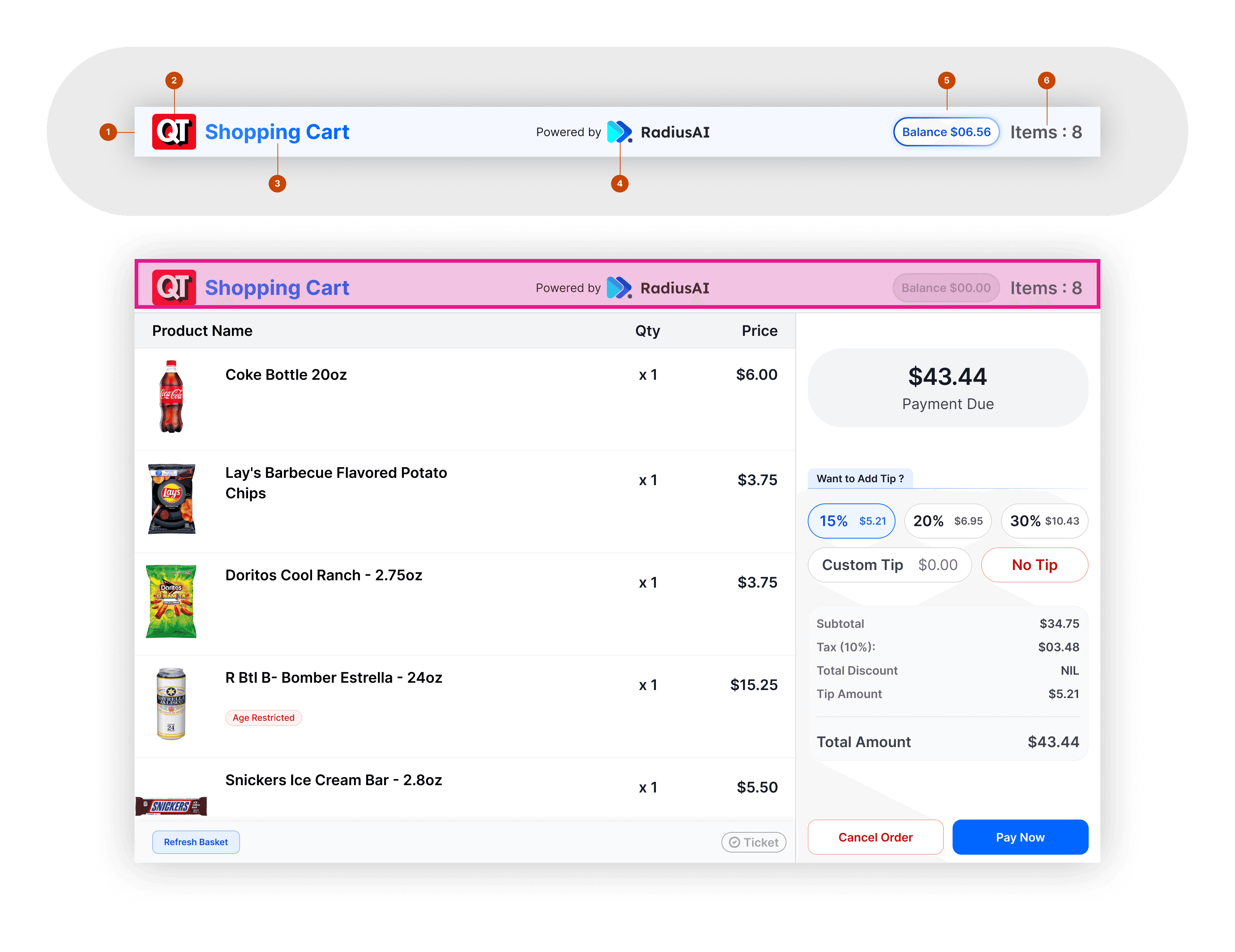
header of the pos
header of the pos
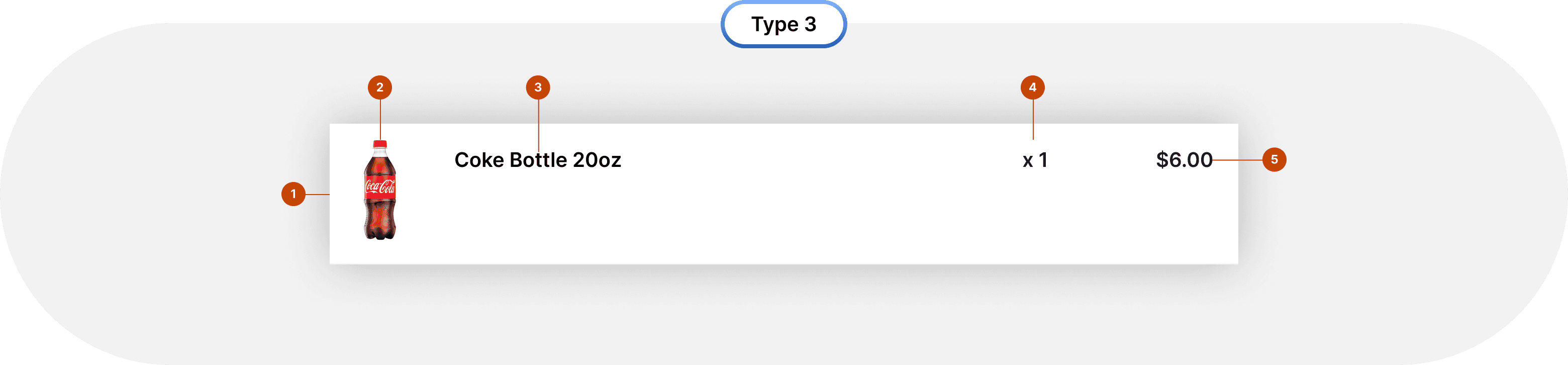
The POS header supports dual branding, showing the business logo alongside the maker’s mark. It also adapts to the brand’s accent color and displays the loader, card balance, and item count.
The POS header supports dual branding, showing the business logo alongside the maker’s mark. It also adapts to the brand’s accent color and displays the loader, card balance, and item count.

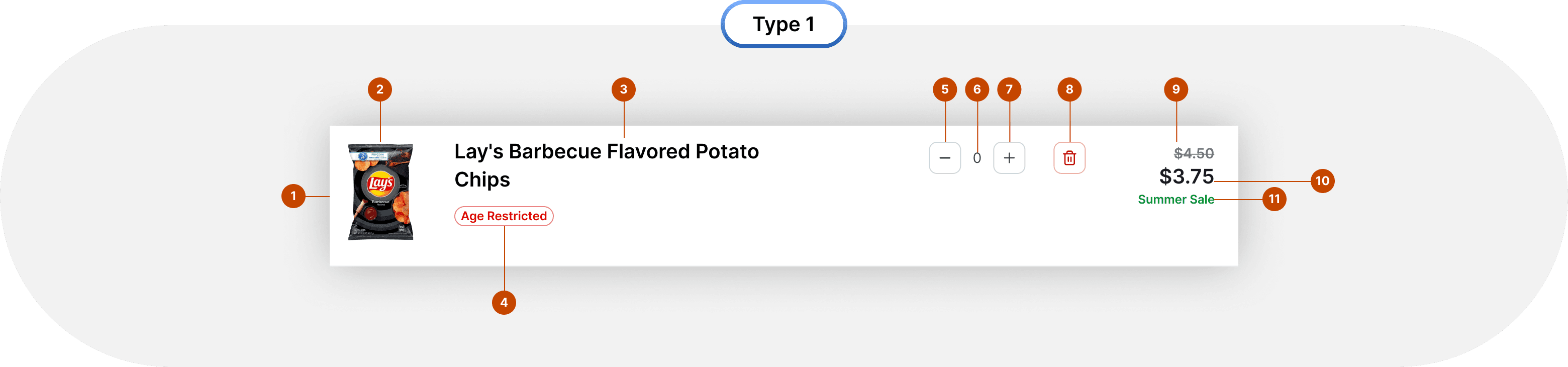
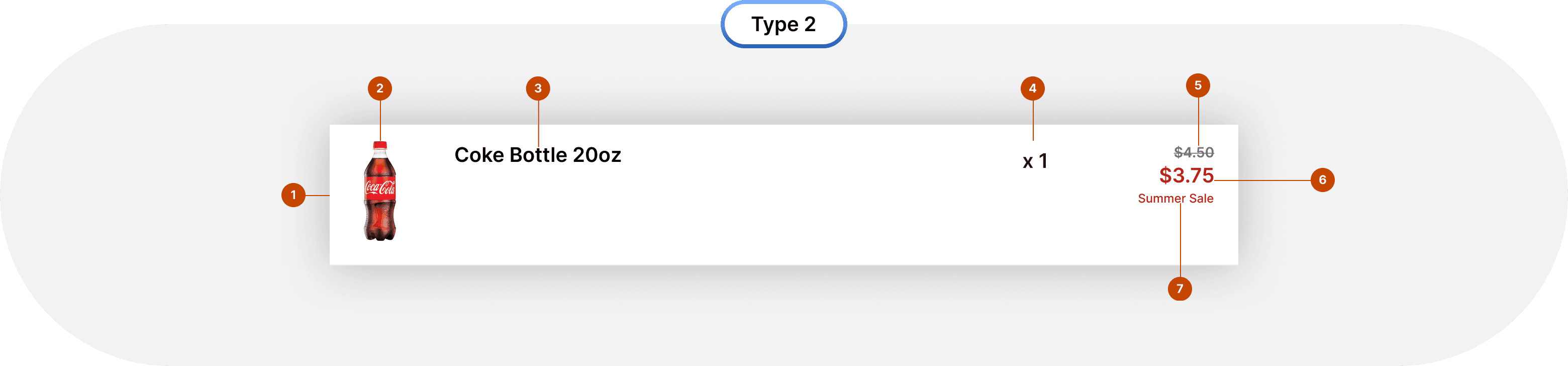
line item anatomy
line item anatomy
The POS header supports dual branding, showing the business logo alongside the maker’s mark. It also adapts to the brand’s accent color and displays the loader, card balance, and item count.
The POS header supports dual branding, showing the business logo alongside the maker’s mark. It also adapts to the brand’s accent color and displays the loader, card balance, and item count.


Phase 2
Checkout for Packed Items
Introduction
Introduction
What's a Packaged Item ?
What's a Packaged Item ?
Packaged containers are food items that are already prepared and packed before checkout.
Examples include a pizza placed inside a pizza box, a beverage poured into a cup with a lid, or food packed inside a transparent box.
This flow explores the ideal customer journey from placing items to completing payment showcasing how checkout unfolds seamlessly in the best-case scenario.
examples of packaged items
examples of packaged items
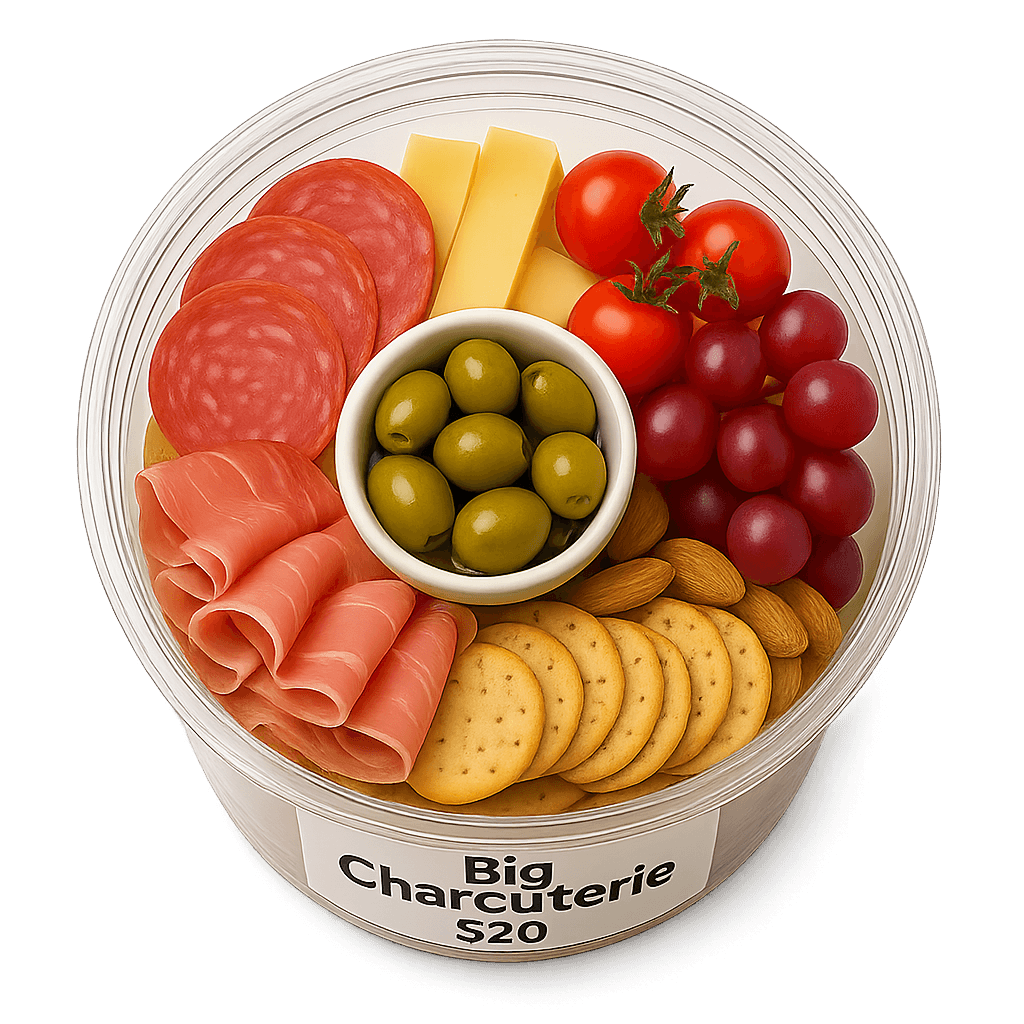
Fig : A box of charcuterie
Example 1 - Charcuterie basket

Fig: A box of Salad / Humus
Example 2 - Humus/Salad Jar
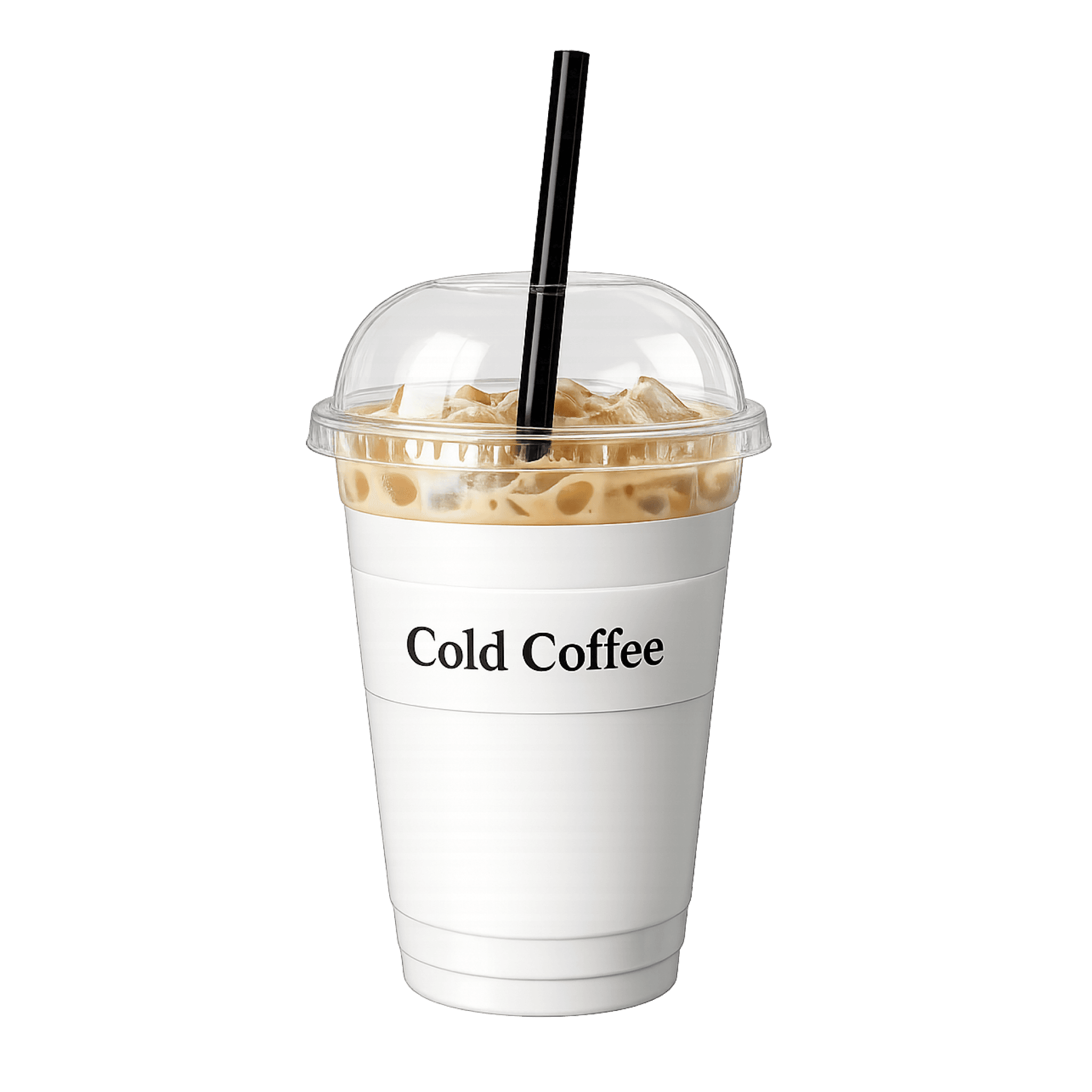
Fig: Beverage cup
Example 3 - Beverage Cup
What's the Problem
What's the Problem
Prepared and unpacked items at QT were added by manually scanning barcodes from a reference sheet.
While functional, this process slowed checkout as item variety and peak-hour volume increased, driving the need for a faster, more intuitive identification method.
This flow explores the ideal customer journey from placing items to completing payment showcasing how checkout unfolds seamlessly in the best-case scenario.
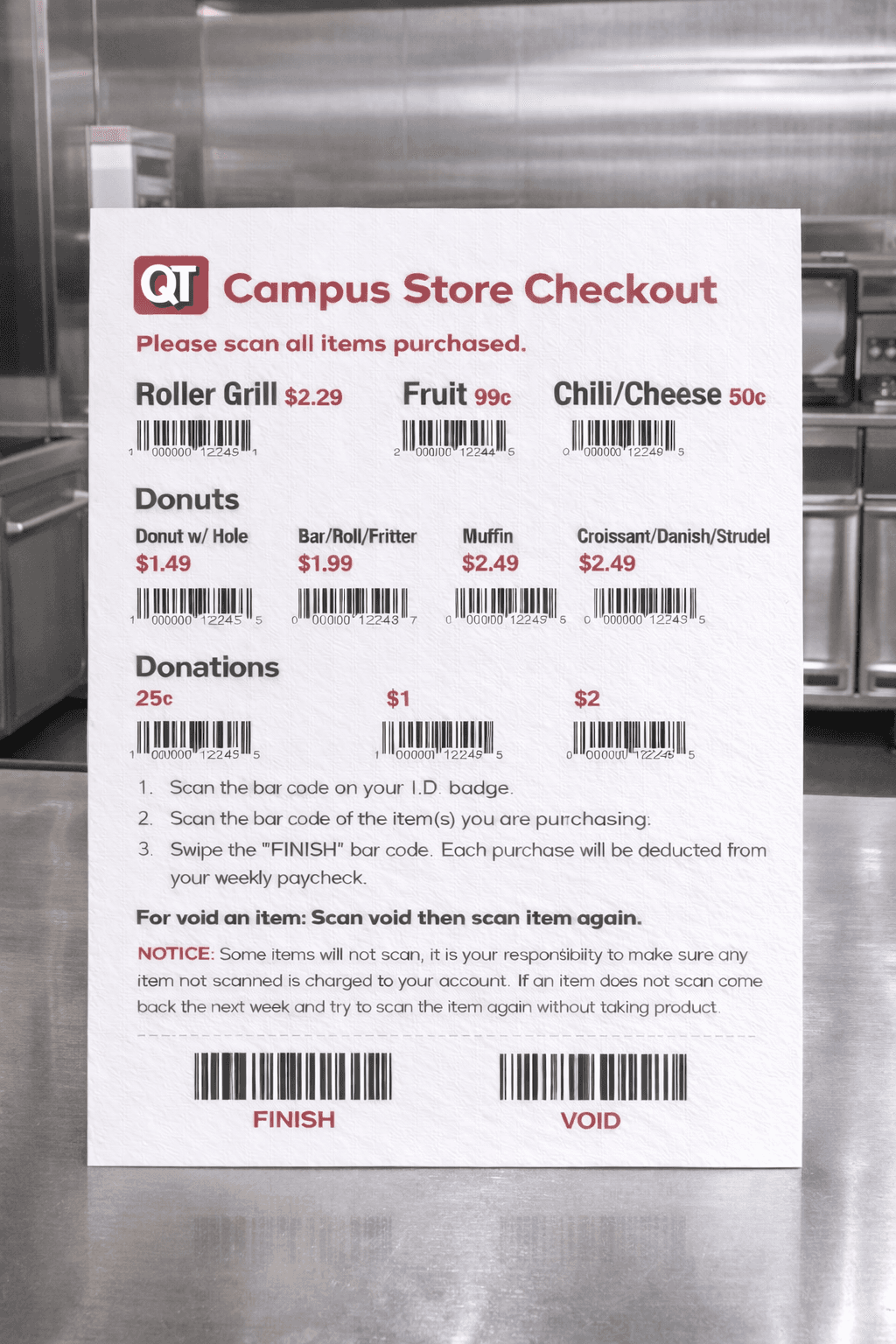
Fig : Barcode chart for Items
Fig : Menu kept at the counter where the cashier scans and bills the user
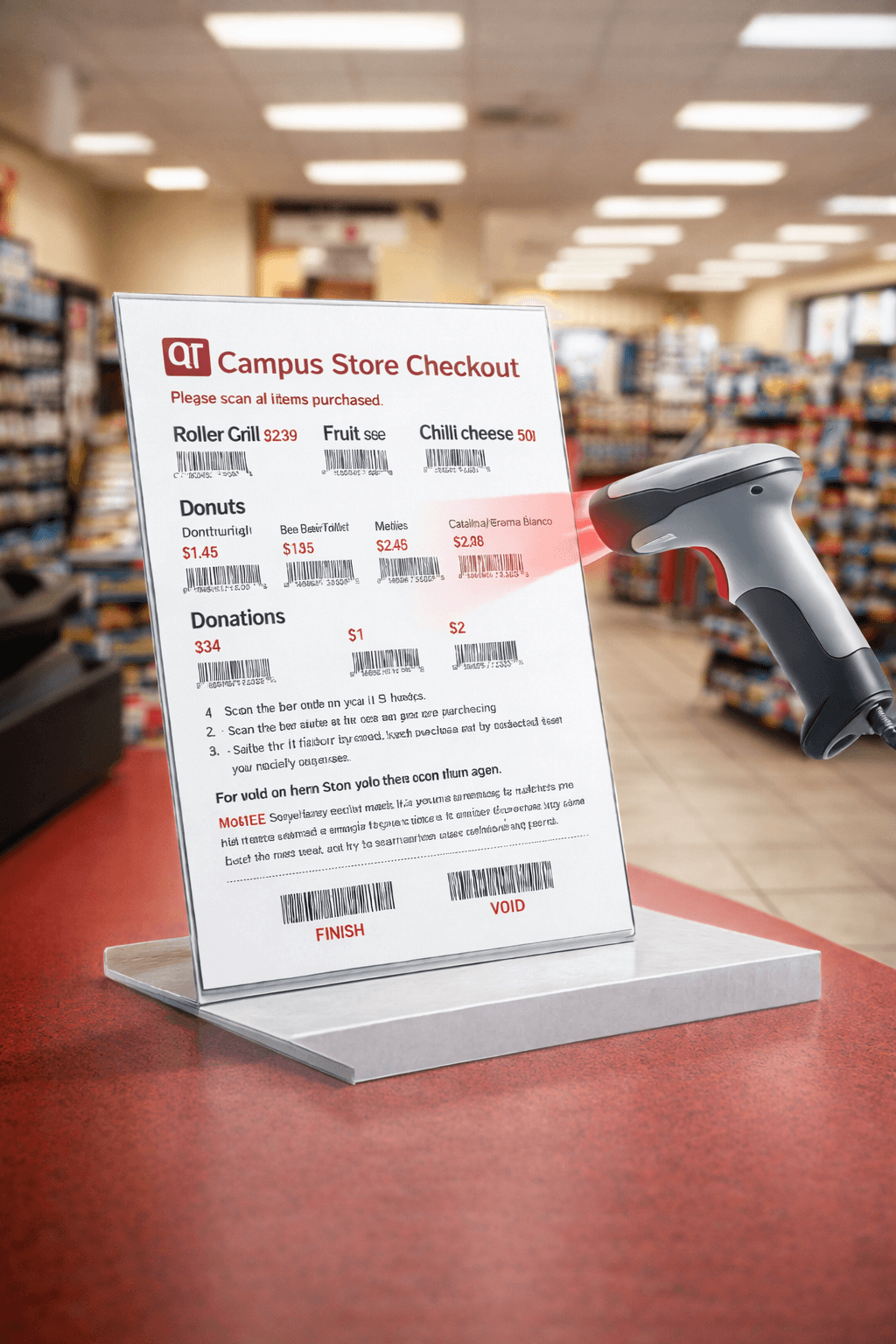
Fig :A cashier adds a packed item to the POS by scanning
the barcode using the scanner.
Fig : Menu kept at the counter where the cashier scans and bills the user
Where Vision Works
Where It Breaks
Where Vision Works
Where It Breaks
Below is a differentiation of what items can manage to pass this wall and what stops to crawl this wall.
Below is a differentiation of what items can manage to pass this wall and what stops to crawl this wall.
Below is a differentiation of what items can manage to pass this wall and what
stops to crawl this wall.
This flow explores the ideal customer journey from placing items to completing payment showcasing how checkout unfolds seamlessly in the best-case scenario.
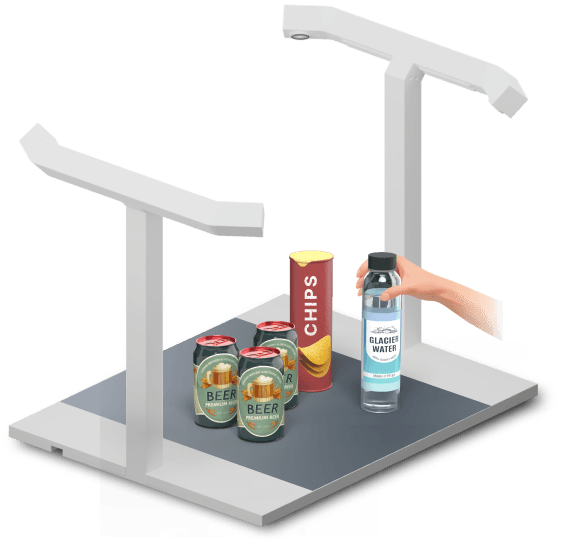
WHAT IS WORKING
WHAT IS WORKING
Computer vision worked well for factory-packaged items like chips, soda, biscuits, and candies. These products are standardized, visually consistent, and sold exactly as manufactured.
Computer vision worked well for factory-packaged items like chips, soda, biscuits, and candies. These products are standardized, visually consistent, and sold exactly as manufactured.
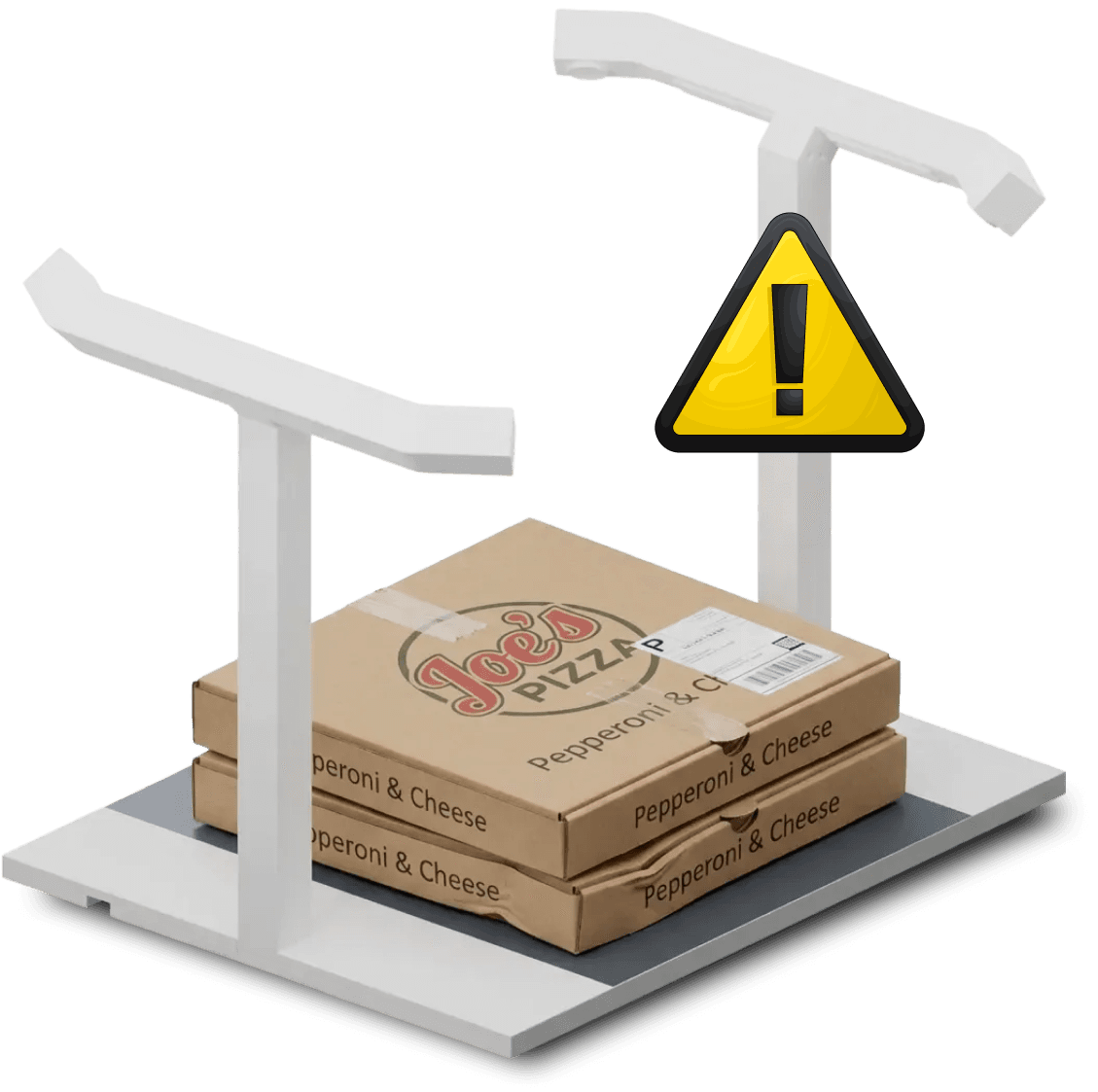
WHAT "HAS" TO WORK
WHAT "HAS" TO WORK
Two pizza boxes or salad containers may appear the same but represent different items in the system.
While the vision model could still recognize the type of food—for example, identifying something as pizza or custard—it could not reliably determine which exact item should be charged, especially at scale and during peak hours.
Two pizza boxes or salad containers may appear the same but represent different items in the system.
While the vision model could still recognize the type of food—for example, identifying something as pizza or custard—it could not reliably determine which exact item should be charged, especially at scale and during peak hours.
Pizza as a Packaged
Item at Checkout
Pizza as a Packaged
Item at Checkout
When a pizza is placed at checkout, the system is not just identifying food, it is resolving a SKU. Using pizza as an example, these are the decisions the system must make before an item can be scanned and charged.
This flow explores the ideal customer journey from placing items to completing payment showcasing how checkout unfolds seamlessly in the best-case scenario.
Which pizza is it?
Margherita, Pepperoni, Veg, Cheese Burst, etc.
What size is it ?
Small, Medium and Large
Which variant or customisation?
Extra cheese, thin crust, gluten-free, add-ons.
How is it priced?
Regular price, combo price, stadium pricing, promotional price.
What SKU does it map to?
The exact internal item used for billing, tax, and reporting.
How should inventory be updated?
Which ingredients or stock buckets should be deducted.
Are there any rules attached?
Tax category, discounts, time-based pricing, or restrictions.
Are there any rules attached?
Tax category, discounts, time-based pricing, or restrictions.
"Multiply these decisions across hundreds of stores and thousands of transactions, and even small friction compounds into system-wide inefficiency. "
This flow explores the ideal customer journey from placing items to completing payment showcasing how checkout unfolds seamlessly in the best-case scenario.
SOLUTION
SOLUTION
SOLUTION
Marker-Assisted Identification
Marker-Assisted Identification
Marker-Assisted Identification
Marker-Assisted Identification
Markers are the most commonly used approaches for deterministic identification in systems adjacent to retail checkout—manufacturing, logistics, robotics, and automation.
This removes ambiguity, ensures correct SKU and pricing, and avoids repeated retraining.
Markers are the most commonly used approaches for deterministic identification in systems adjacent to retail checkout—manufacturing, logistics, robotics, and automation.
This removes ambiguity, ensures correct SKU and pricing, and avoids repeated retraining.
This flow explores the ideal customer journey from placing items to completing payment showcasing how checkout unfolds seamlessly in the best-case scenario.
criteria to find the
best fitmarker
criteria to find the
best fitmarker
The comparison was based on checkout-specific constraints, not theoretical capability.
Each marker was evaluated against the same set of questions:
The comparison was based on checkout-specific constraints, not theoretical capability.
Each marker was evaluated against the same set of questions:
Does it work with standard cameras?
Checkout should not require new hardware.
Does it require explicit user or cashier action?
Checkout should not require new hardware.
How fast can it be detected?
Checkout should not require new hardware.
Does it scale operationally across stores?
Cost, setup, and maintenance must stay low.
How reliable is it under real-world conditions?
Lighting, motion, partial occlusion, and speed matter.
markers introduction
markers introduction
markers introduction
Marker Types
Marker Types
Evaluating marker technologies for high-speed checkout environments. ArUco markers emerge as the optimal choice for real-time vision-based identification.
Evaluating marker technologies for high-speed checkout environments. ArUco markers emerge as the optimal choice for real-time vision-based identification.
This flow explores the ideal customer journey from placing items to completing payment showcasing how checkout unfolds seamlessly in the best-case scenario.
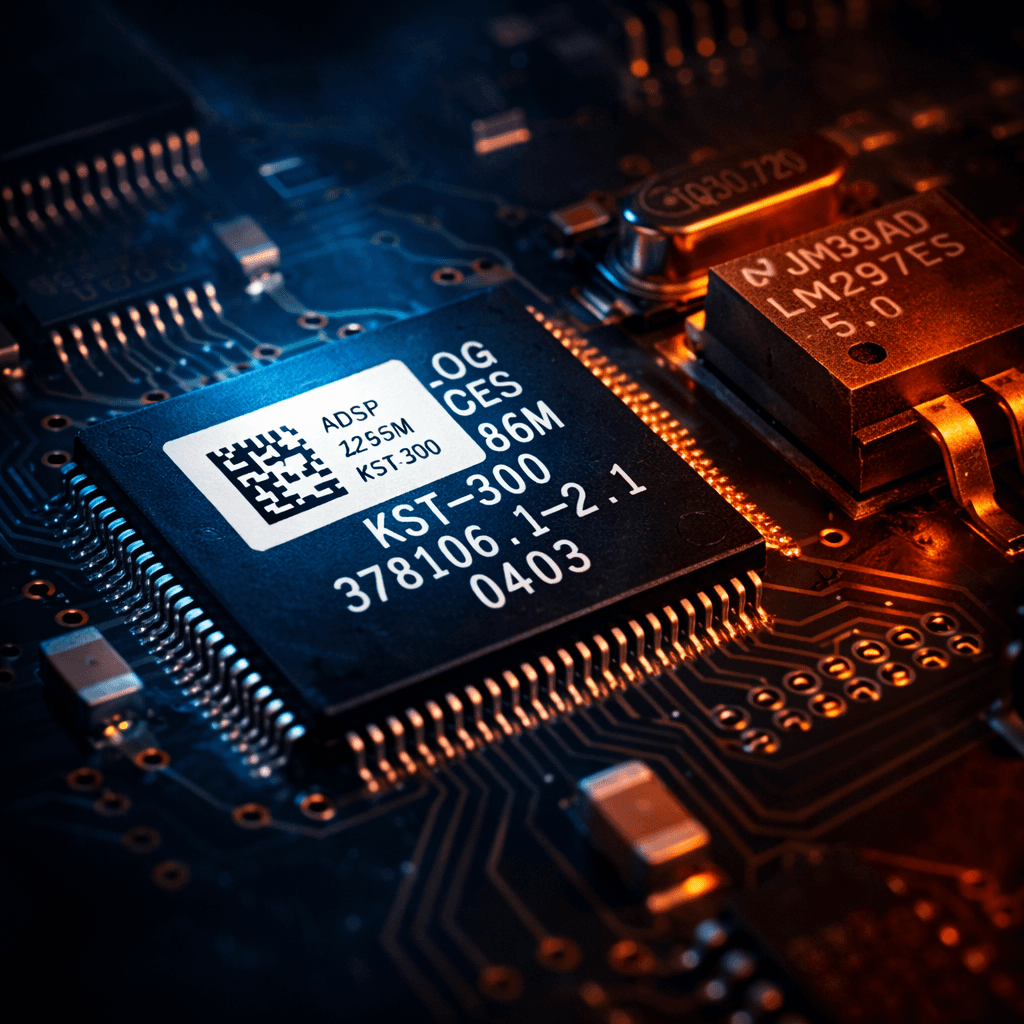
Data Matrix
Checkout should not require new hardware.
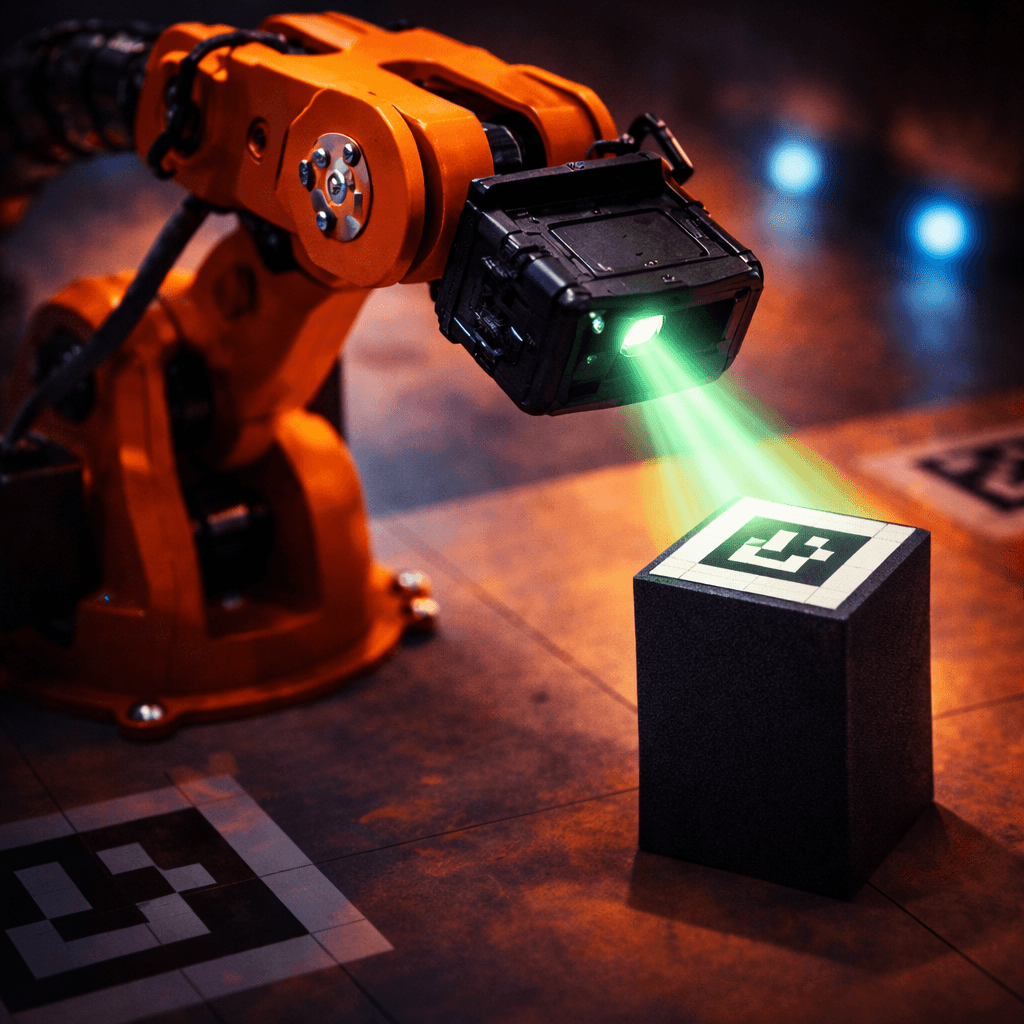
ArUco
Lightweight visual marker enabling fast, deterministic identification using standard cameras at checkout.
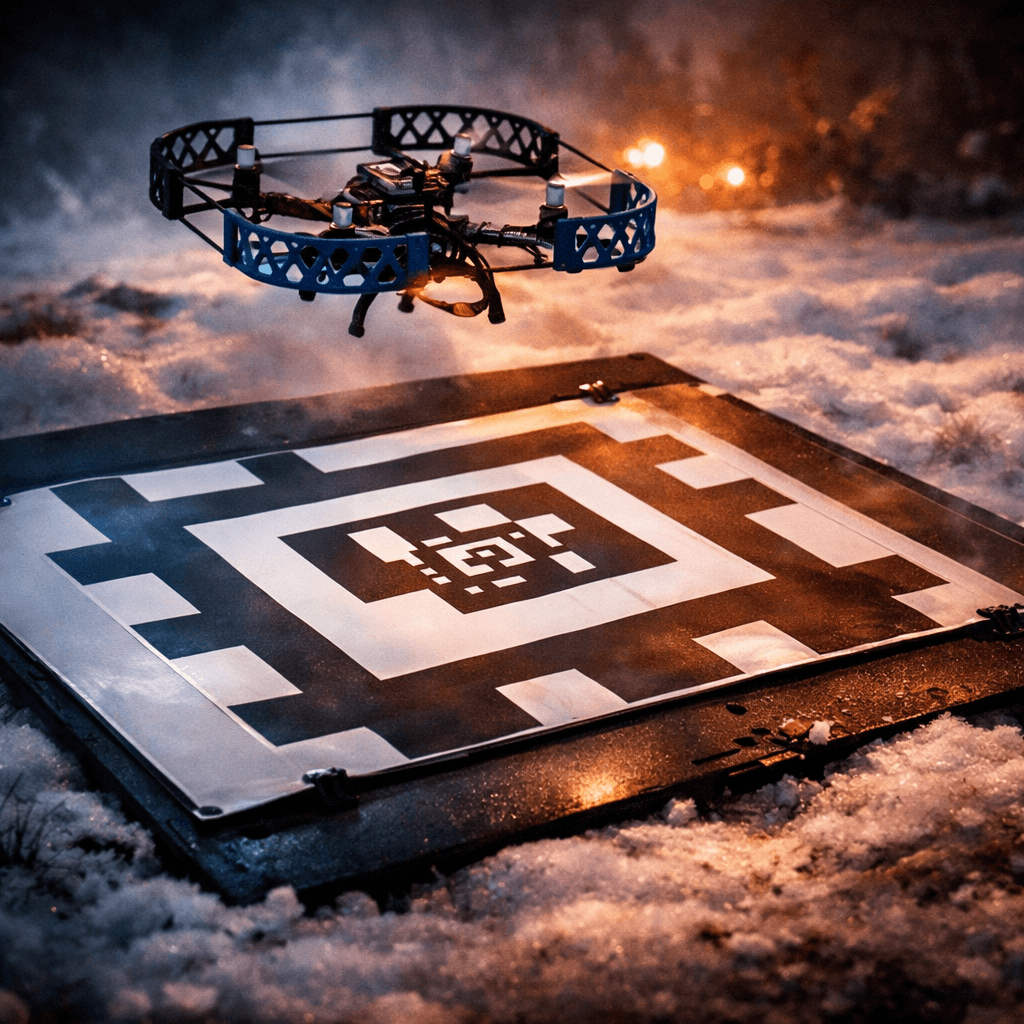
AprilTag
Robust visual marker built for robotics and spatial tracking, optimized for pose estimation over speed.
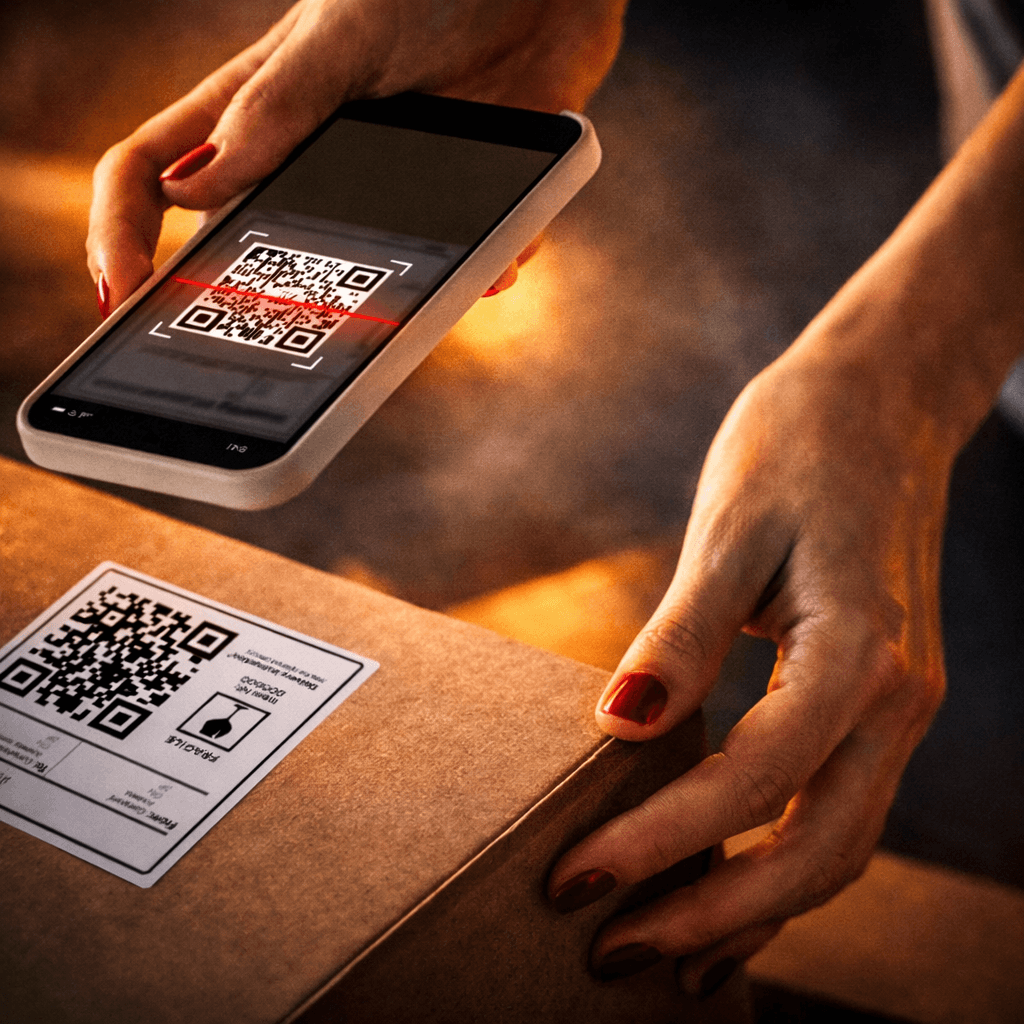
QR Code
Widely used visual code for packaging and logistics, but orientation-sensitive and slower at checkout.

RFID
Tag-based identification without line of sight, requiring dedicated readers and controlled environments.
markers introduction
markers introduction
markers introduction
Marker Types
Marker Types
Marker Types
Evaluating marker technologies for high-speed checkout environments. ArUco markers emerge as the optimal choice for real-time vision-based identification.
Evaluating marker technologies for high-speed checkout environments. ArUco markers emerge as the optimal choice for real-time vision-based identification.
This flow explores the ideal customer journey from placing items to completing payment showcasing how checkout unfolds seamlessly in the best-case scenario.
Marker Type
USED IN
LINE OF SIGHT
HARDWARE
SPEED & ROBUSTNESS
STABILITY
QR Code
Packaging, logistics
Required
Standard camera
Slower, orientation-sensitive
LOW
Data Matrix
Manufacturing, pharma
Required
Standard camera
High accuracy, close-range
LOW
RFID
Warehousing, supply chain
Not required
Dedicated readers
Fast, interference-prone
LOW
AprilTag
Robotics, navigation
Required
Standard camera
Highly robust, spatially optimized
MEDIUM
ArUco
Vision systems, automation
Required
Standard camera
Fast, lightweight, reliable
HIGH
Marker Type
USED IN
LINE OF SIGHT
HARDWARE
SPEED & ROBUSTNESS
STABILITY
QR Code
Packaging, logistics
Required
Standard camera
Slower, orientation-sensitive
LOW
Data Matrix
Manufacturing, pharma
Required
Standard camera
High accuracy, close-range
LOW
RFID
Warehousing, supply chain
Not required
Dedicated readers
Fast, interference-prone
LOW
AprilTag
Robotics, navigation
Required
Standard camera
Highly robust, spatially optimized
MEDIUM
ArUco
Vision systems, automation
Required
Standard camera
Fast, lightweight, reliable
HIGH
Marker Type
USED IN
LINE OF SIGHT
HARDWARE
SPEED & ROBUSTNESS
STABILITY
QR Code
Packaging, logistics
Required
Standard camera
Slower, orientation-sensitive
LOW
Data Matrix
Manufacturing, pharma
Required
Standard camera
High accuracy, close-range
LOW
RFID
Warehousing, supply chain
Not required
Dedicated readers
Fast, interference-prone
LOW
AprilTag
Robotics, navigation
Required
Standard camera
Highly robust, spatially optimized
MEDIUM
ArUco
Vision systems, automation
Required
Standard camera
Fast, lightweight, reliable
HIGH
Marker Type
USED IN
LINE OF SIGHT
HARDWARE
SPEED & ROBUSTNESS
STABILITY
QR Code
Packaging, logistics
Required
Standard camera
Slower, orientation-sensitive
LOW
Data Matrix
Manufacturing, pharma
Required
Standard camera
High accuracy, close-range
LOW
RFID
Warehousing, supply chain
Not required
Dedicated readers
Fast, interference-prone
LOW
AprilTag
Robotics, navigation
Required
Standard camera
Highly robust, spatially optimized
MEDIUM
ArUco
Vision systems, automation
Required
Standard camera
Fast, lightweight, reliable
HIGH
best fit comparision
best fit comparision
Vision-Based Identification Matrix
Vision-Based Identification Matrix
Vision-Based Identification Matrix
A comparative analysis of marker technologies across visual detection, identity certainty, and operational retail constraints.
Based on the Ven Diagram, ArUco is the only marker that simultaneously meets vision, identity, and checkout constraints without adding hardware or workflow friction.
A comparative analysis of marker technologies across visual detection, identity certainty, and operational retail constraints.
Based on the Ven Diagram, ArUco is the only marker that simultaneously meets vision, identity, and checkout constraints without adding hardware or workflow friction.
A comparative analysis of marker technologies across visual detection, identity certainty, and operational retail constraints.
Based on the Ven Diagram, ArUco is the only marker that simultaneously meets vision, identity, and checkout constraints without adding hardware or workflow friction.
This flow explores the ideal customer journey from placing items to completing payment showcasing how checkout unfolds seamlessly in the best-case scenario.
C2
C2
Visual Markers
Visual Markers
C2
C2
Checkout Constraints
Checkout Constraints
C2
C2
Deterministic ID
Deterministic ID
QR Code
QR Code
Data Matrix
Data Matrix
RFID
RFID
AprilTag
AprilTag
ArUco
ArUco
Fig : ArUco sits at the intersection of visual detection, deterministic identification,
and checkout constraints making it the most well-suited choice for this system.
Visual Markers
Detectable using standard cameras and line-of-sight.
Deterministic ID
Exact, unambiguous identity strings for high fidelity.
Checkout Constraints
Optimized for speed, scalability, and zero extra hardware.
aruco marker placements
aruco marker placements
aruco marker placements
Application on items
Application on items
Application on items
Evaluating marker technologies for high-speed checkout environments. ArUco markers emerge as the optimal choice for real-time vision-based identification.
This flow explores the ideal customer journey from placing items to completing payment showcasing how checkout unfolds seamlessly in the best-case scenario.
placement of aruco mARKERS
ON THE PACKAGED ITEMS
placement of aruco mARKERS
ON THE PACKAGED ITEMS
placement of aruco mARKERS
ON THE PACKAGED ITEMS

Fig : A box of charcuterie
Fig : A box of charcuterie
Fig : ArUco sits at the intersection of visual

Fig: A box of Salad / Humus
Fig: A box of Salad / Humus
Fig : ArUco sits at the intersection of visual
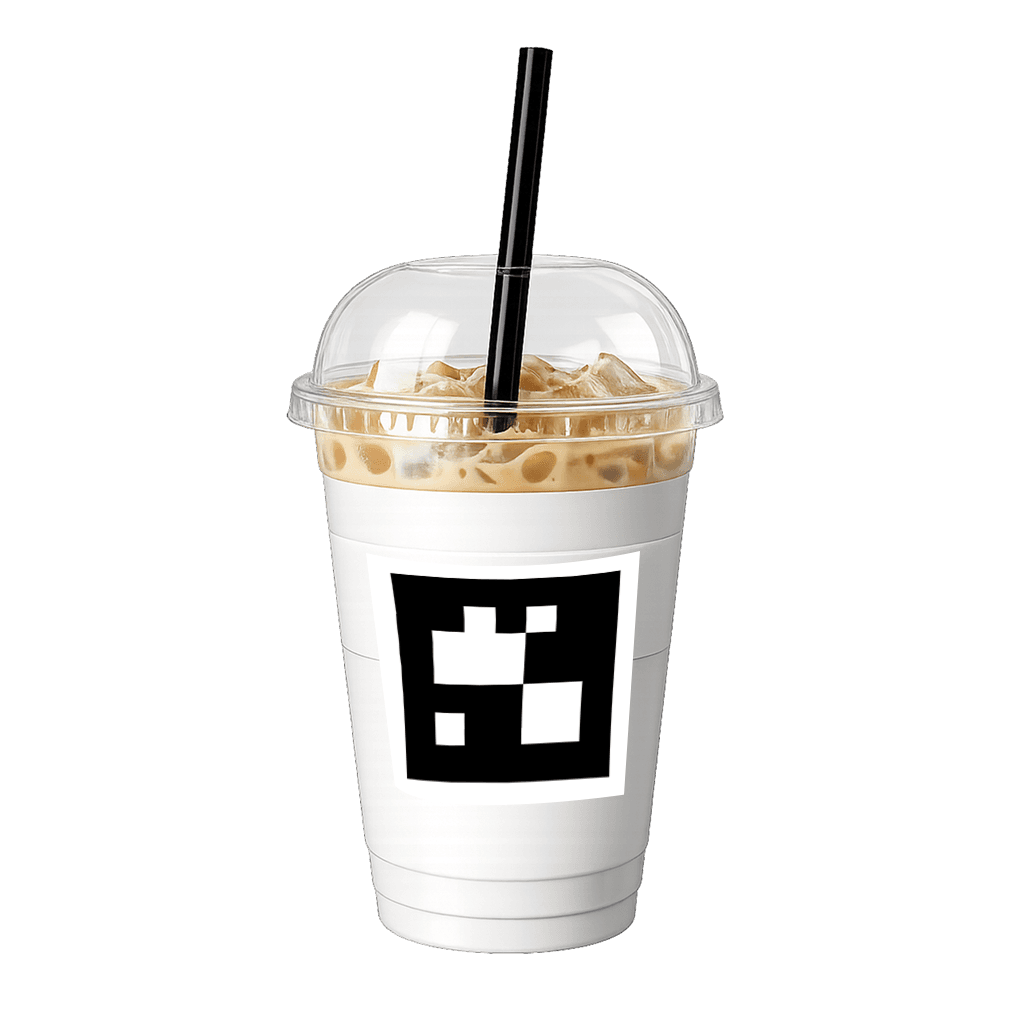
Fig: Beverage cup
Fig: Beverage cup
Fig : ArUco sits at the intersection of visual
Demonstrating how users place
items on the base
Demonstrating how users place
items on the base
Demonstrating how users place items on the base
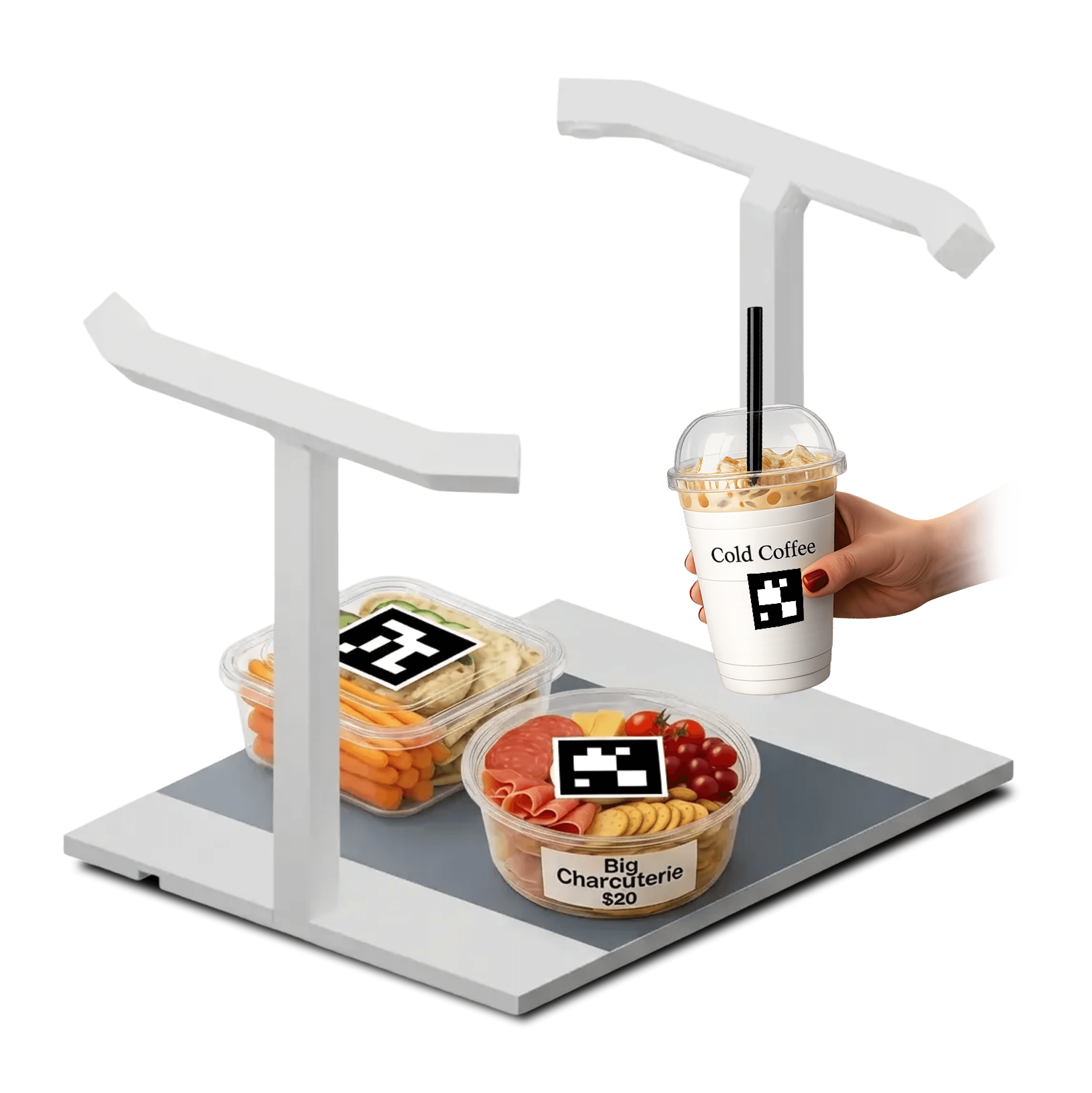
Fig: A typical mental model of a user lets the camera,
to scan the marker in the real time
This flow explores the ideal customer journey from placing items to completing payment showcasing how checkout unfolds seamlessly in the best-case scenario.
packaged items on POS
packaged items
on POS
packaged items on POS
packaged items on POS
Design
Implementation
Design
Implementation
Design Implementation
Design
Implementation
Evaluating marker technologies for high-speed checkout environments. ArUco markers emerge as the optimal choice for real-time vision-based identification.
Evaluating marker technologies for high-speed checkout environments. ArUco markers emerge as the optimal choice for real-time vision-based identification.
This flow explores the ideal customer journey from placing items to completing payment showcasing how checkout unfolds seamlessly in the best-case scenario.
View the demo
with NVIDIA
This flow maps the happy path of AI-assisted checkout, where overhead cameras identify items in real time and instantly sync them with the POS.
It also shows how unknown items are gracefully intercepted, enabling quick cashier intervention while keeping the customer journey uninterrupted.